OpenAI, Mistral, Gemini, Albert
Cloud APIs reached with an API key declared in the environment of the server (see the Show Variables dialog of r-ioga). Unchanged: pick the provider, then the model.
 r-io suitereference docs
Run the AI assistants of r-io suite without API key nor quota: Ollama embedded in the server, installed and started on demand with a model recommended for the hardware, or an Ollama server already running, reached by its URL.
The AI assistants (model invention, RAG, picture analysis, command assistant) use the AI service chosen on each project in r-ioga Edit project. The choice is split into two families.
Cloud APIs reached with an API key declared in the environment of the server (see the Show Variables dialog of r-ioga). Unchanged: pick the provider, then the model.
The server downloads Ollama itself (native binary, no Docker), starts it on demand on its own port and pulls the chosen model. Nothing leaves the machine; no key, no quota.
An Ollama server already running on the network (for example a GPU server of the lab). Only its URL is entered; it is stored in the project.
In the IA & RAG Knowledge documents card, the first list, IA Service, switches between External provider and Local service. With the local service, the second list becomes the Ollama mode (Embedded or External) and a panel shows the state of the service read on the server.
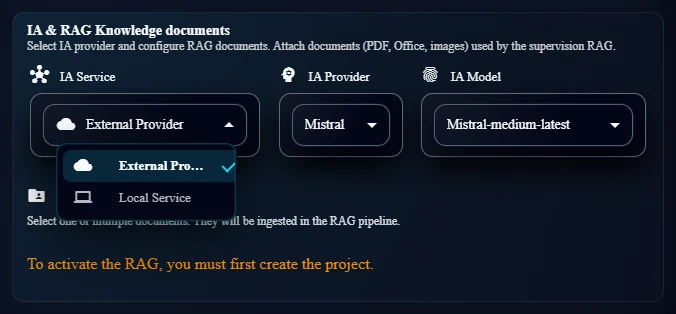
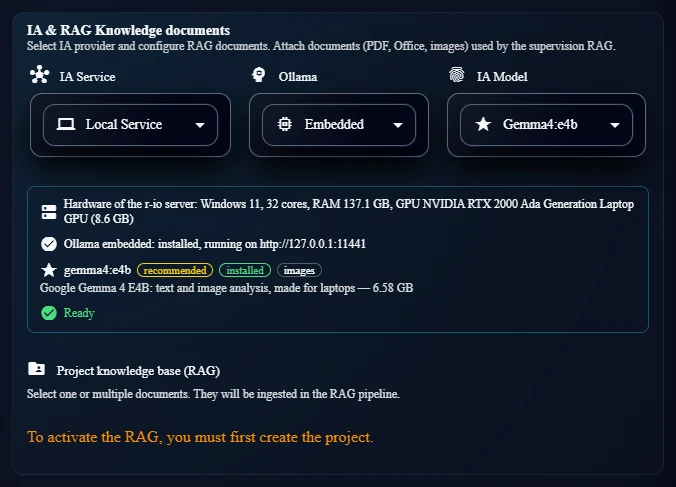
Ollama embedded runs on the machine that runs r-io suite, not on the browser machine. The panel therefore shows the memory and the GPU of the server, and the recommendation depends on them.
OllamaEmbeddedRuntime manages one Ollama per machine, shared by every distribution of the machine (like the embedded MongoDB binaries).
# 1. find a binary
~/.embeddedOllamaRio/bin/ollama(.exe)        # installed by r-io suite
or an Ollama already installed               # PATH, %LOCALAPPDATA%\Programs\Ollama, /Applications/Ollama.app
# 2. otherwise download the release archive (about 1.4 GB on Windows)
github.com/ollama/ollama/releases/latest/download/ollama-windows-amd64.zip | ollama-linux-amd64.tar.zst | ollama-darwin.tgz
# 3. start on demand (first AI call or installation)
OLLAMA_HOST   = 127.0.0.1:11441                 # system property rio.ollama.port
OLLAMA_MODELS = ~/.embeddedOllamaRio/models
ollama serve  >>  ~/.embeddedOllamaRio/ollama.log
The embedded server listens on 11441, not 11434, so it never collides with an Ollama started by the user. A server already answering on 11441 (started by another instance of the machine) is reused and is not stopped by this instance.
Nothing starts at boot: a distribution that does not use the local service pays nothing. The process started by the server is stopped with it; Ollama itself unloads an idle model after five minutes.
Binary and models live in the user home and are shared: a model of several gigabytes is downloaded once for every distribution and every worktree of the machine.
The model list merges the r-io suite catalog (ollama/ollama-model-catalog.json) and the models already installed on the Ollama server. Icons: a star marks the recommended model, a check an installed model, a download arrow a model to install.
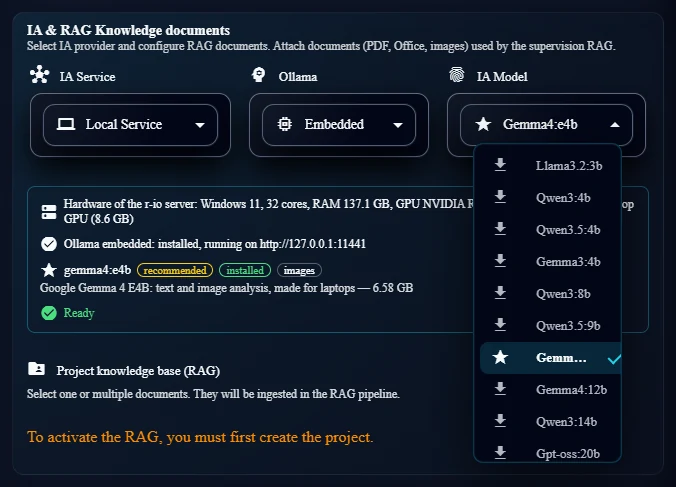
OllamaHardware reads the physical memory, the cores and, with nvidia-smi, the NVIDIA GPU with the most memory. On Apple Silicon two thirds of the unified memory are counted as GPU memory. Other GPUs are not detected: the CPU rule then applies.
With a GPU, a model fits when its size is at most 80 % of the GPU memory (the rest is kept for the context). Without GPU, at most 40 % of the RAM and 7 GB, beyond which answers take minutes. Among the models that fit, a model fitting in the GPU comes first, then the biggest, then one accepting images. When nothing fits, the smallest model.
An NVIDIA RTX 2000 Ada (8.6 GB) accepts models up to about 6.9 GB: gemma4:e4b (6.58 GB, text and images) is recommended; gemma4:12b and bigger are marked too big for the server.
| Model | Size | Images | Note |
|---|---|---|---|
llama3.2:3b | 2.0 GB | — | Small and fast |
qwen3:4b | 2.5 GB | — | Small, good at structured JSON |
qwen3.5:4b | 3.3 GB | yes | Small |
gemma3:4b | 3.4 GB | yes | Small |
qwen3:8b | 5.2 GB | — | Balance for the RAG extraction |
qwen3.5:9b | 6.6 GB | yes | |
gemma4:e4b | 6.6 GB | yes | Made for laptops |
gemma4:12b | 8.0 GB | yes | |
qwen3:14b | 9.3 GB | — | |
gpt-oss:20b | 13.8 GB | — | Reasoning |
mistral-small3.2:24b | 15.2 GB | — | Same family as the Albert model |
qwen3.5:27b | 17.5 GB | yes | Big GPU |
gemma4:31b | 20.4 GB | yes | Default model of Albert, big GPU |
Sizes are the download sizes read on the Ollama registry on 2026-10-16; “images” means the manifest carries a projector layer. Once a model is installed, its real capabilities are read on the server (POST /api/show) and take precedence over the catalog.
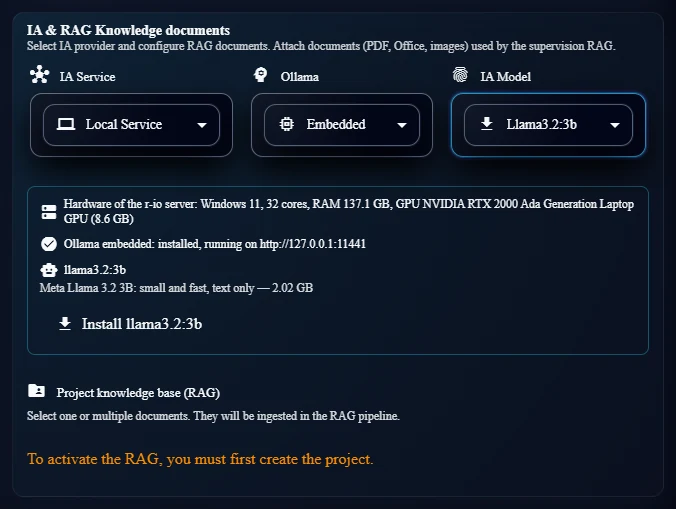
When the selected model, Ollama itself (embedded mode) or the RAG embedding model is missing, the panel shows an Install button. The installation runs in background on the server (OllamaInstallManager); r-ioga polls its progress every second without opening the loading dialog.
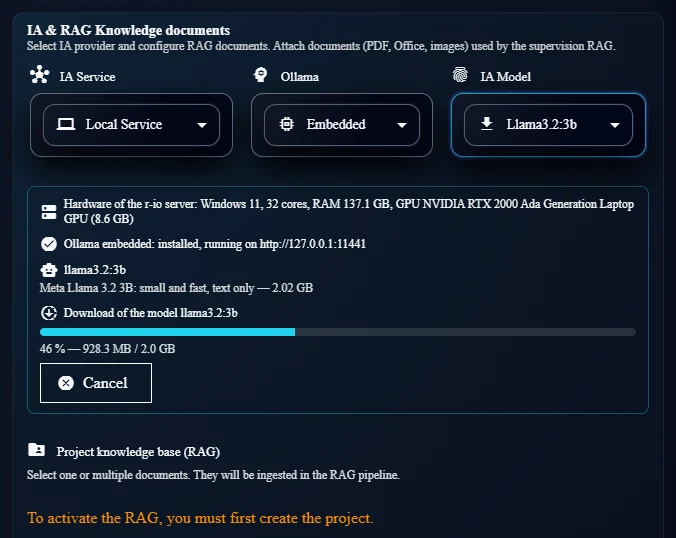
DOWNLOAD_OLLAMA        # embedded mode, when no binary is found
START_OLLAMA           # embedded mode
PULL_MODEL             # POST /api/pull, streamed progress summed over the layers
PULL_EMBEDDING_MODEL   # nomic-embed-text (0.3 GB), when missing
READY
gemma4:e4b and nomic-embed-text were installed in about four minutes (around 40 MB/s).Choose External, enter the URL of the server (default proposal http://localhost:11434) and click Connect. The list then shows the catalog and the models installed on that server. The URL is stored in the project.
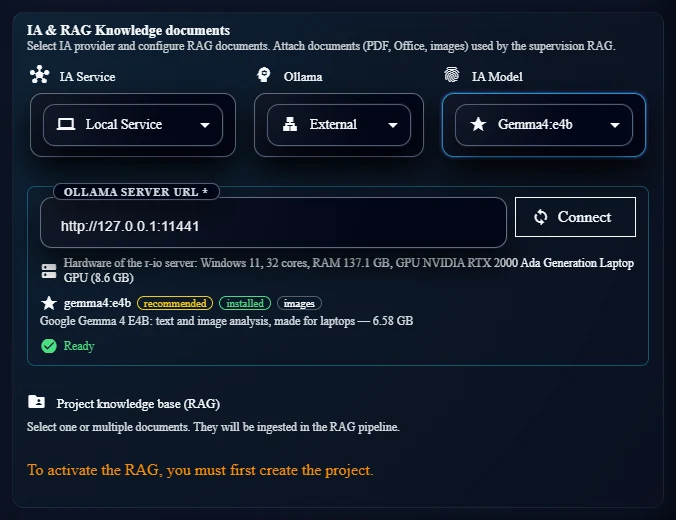
localhost designates the machine of r-io suite.OllamaChatModelBuilder builds one LangChain4j chat model per server, model and settings, and reuses it.
Model, temperature and maximum tokens of the context are applied. Answers are requested in JSON, the context window is 16,384 tokens (Ollama loads 4,096 by default, too short for the RAG prompts) and a request is abandoned after ten minutes. Reasoning models are called with thinking off.
If the project model does not accept images, another installed model accepting images is used, with a warning in the log. If none is installed, the error asks to install one from Edit project.
The first call loads the model into memory: about 100 s for gemma4:e4b the first time on the laboratory laptop. Then, with the model fully on the GPU, a short JSON answer came back in less than one second.
The RAG embeddings use nomic-embed-text on the same server as the chat model. Changing the provider of a project still empties its RAG store: ingest the documents again after the change.
| Project property | Value | Read by |
|---|---|---|
IA Provider Name | OLLAMA | AIChatbotClient.createChatContext → ollamaContext of ai-chatbot.xsd |
IA Model Name | Ollama name with its tag, e.g. gemma4:e4b (free text) | |
IA Ollama Mode | EMBEDDED (default) or EXTERNAL | |
IA Ollama URL | URL of the external server, required in external mode |
| REST resource (r-ioga) | Role |
|---|---|
GET …/generic-application/aichatbot/ollama/status?mode=&url= | Hardware, embedded runtime, reachability, models with the recommended one |
POST …/ollama/install {mode, url, model} | Starts a background installation, returns the task |
GET …/ollama/install/{taskId} | Phase, percentage, bytes, speed, error |
POST …/ollama/install/{taskId}/cancel | Cancels the running installation |
The former keys ollama and ollama-embedded of unified_config.properties no longer exist: everything is configured per project.
ollama.exe keeps running on 11441; the next start reuses it.gind-governance-ai-chatbot, package service.builder.model.ollama: OllamaChatModelBuilder, OllamaEmbeddedRuntime, OllamaHardware, OllamaModelCatalog, OllamaInstallManager; catalog src/main/resources/ollama/ollama-model-catalog.json.ai-chatbot.xsd (ollamaContext, OllamaMode) and AIChatbotClient; Project_MetaModel.xml (IA Ollama Mode, IA Ollama URL).AIChatbotResource (REST resources) and r-ioga edit-project-page, ai-chatbot.service.ts.Faire tourner les assistants IA de r-io suite sans clé d’API ni quota : Ollama embarqué dans le serveur, installé et démarré à la demande avec un modèle recommandé pour le matériel, ou un serveur Ollama déjà en place, joint par son URL.
Les assistants IA (invention de modèle, RAG, analyse d’images, assistant de commande) utilisent le service d’IA choisi sur chaque projet dans Edit project de r-ioga. Ce choix est séparé en deux familles.
API cloud jointes avec une clé déclarée dans l’environnement du serveur (voir la boîte Show Variables de r-ioga). Inchangé : choisir le fournisseur, puis le modèle.
Le serveur télécharge lui-même Ollama (binaire natif, sans Docker), le démarre à la demande sur son propre port et tire le modèle choisi. Rien ne sort de la machine ; ni clé, ni quota.
Un serveur Ollama déjà en place sur le réseau (par exemple un serveur GPU du laboratoire). Seule son URL est saisie ; elle est enregistrée dans le projet.
Dans la carte IA & RAG Knowledge documents, la première liste, IA Service, bascule entre External provider et Local service. Avec le service local, la deuxième liste devient le mode Ollama (Embedded ou External) et un panneau affiche l’état du service lu sur le serveur.
Ollama embarqué tourne sur la machine qui fait tourner r-io suite, pas sur celle du navigateur. Le panneau affiche donc la mémoire et le GPU du serveur, et la recommandation en dépend.
OllamaEmbeddedRuntime gère un seul Ollama par machine, partagé par toutes les distributions de la machine (comme les binaires de MongoDB embarqué).
# 1. trouver un binaire
~/.embeddedOllamaRio/bin/ollama(.exe)        # installé par r-io suite
ou un Ollama déjà installé                   # PATH, %LOCALAPPDATA%\Programs\Ollama, /Applications/Ollama.app
# 2. sinon télécharger l’archive de la release (environ 1,4 Go sous Windows)
github.com/ollama/ollama/releases/latest/download/ollama-windows-amd64.zip | ollama-linux-amd64.tar.zst | ollama-darwin.tgz
# 3. démarrer à la demande (premier appel IA ou installation)
OLLAMA_HOST   = 127.0.0.1:11441                 # propriété système rio.ollama.port
OLLAMA_MODELS = ~/.embeddedOllamaRio/models
ollama serve  >>  ~/.embeddedOllamaRio/ollama.log
Le serveur embarqué écoute sur 11441, pas sur 11434, pour ne jamais entrer en conflit avec un Ollama lancé par l’utilisateur. Un serveur qui répond déjà sur 11441 (lancé par une autre instance de la machine) est réutilisé et n’est pas arrêté par cette instance.
Rien ne démarre au lancement : une distribution qui n’utilise pas le service local ne paie rien. Le processus démarré par le serveur s’arrête avec lui ; Ollama décharge de lui-même un modèle inactif au bout de cinq minutes.
Binaire et modèles sont dans le dossier utilisateur et partagés : un modèle de plusieurs gigaoctets n’est téléchargé qu’une fois pour toutes les distributions et tous les worktrees de la machine.
La liste des modèles réunit le catalogue de r-io suite (ollama/ollama-model-catalog.json) et les modèles déjà installés sur le serveur Ollama. Icônes : une étoile pour le modèle recommandé, une coche pour un modèle installé, une flèche de téléchargement pour un modèle à installer.
OllamaHardware lit la mémoire physique, les cœurs et, avec nvidia-smi, le GPU NVIDIA qui a le plus de mémoire. Sur Apple Silicon, deux tiers de la mémoire unifiée comptent comme mémoire GPU. Les autres GPU ne sont pas détectés : la règle CPU s’applique alors.
Avec un GPU, un modèle tient si sa taille ne dépasse pas 80 % de la mémoire du GPU (le reste est gardé pour le contexte). Sans GPU, au plus 40 % de la RAM et 7 Go, au-delà les réponses prennent des minutes. Parmi les modèles qui tiennent, un modèle qui tient dans le GPU passe d’abord, puis le plus gros, puis celui qui accepte les images. Si rien ne tient, le plus petit modèle.
Une NVIDIA RTX 2000 Ada (8,6 Go) accepte des modèles jusqu’à 6,9 Go environ : gemma4:e4b (6,58 Go, texte et images) est recommandé ; gemma4:12b et au-delà sont signalés trop gros pour le serveur.
| Modèle | Taille | Images | Remarque |
|---|---|---|---|
llama3.2:3b | 2,0 Go | — | Petit et rapide |
qwen3:4b | 2,5 Go | — | Petit, bon en JSON structuré |
qwen3.5:4b | 3,3 Go | oui | Petit |
gemma3:4b | 3,4 Go | oui | Petit |
qwen3:8b | 5,2 Go | — | Équilibre pour l’extraction RAG |
qwen3.5:9b | 6,6 Go | oui | |
gemma4:e4b | 6,6 Go | oui | Conçu pour les portables |
gemma4:12b | 8,0 Go | oui | |
qwen3:14b | 9,3 Go | — | |
gpt-oss:20b | 13,8 Go | — | Raisonnement |
mistral-small3.2:24b | 15,2 Go | — | Même famille que le modèle Albert |
qwen3.5:27b | 17,5 Go | oui | Gros GPU |
gemma4:31b | 20,4 Go | oui | Modèle par défaut d’Albert, gros GPU |
Les tailles sont celles du téléchargement, lues dans le registre Ollama le 2026-10-16 ; « images » signifie que le manifeste contient une couche de projection. Une fois un modèle installé, ses capacités réelles sont lues sur le serveur (POST /api/show) et priment sur le catalogue.
Quand il manque le modèle choisi, Ollama lui-même (mode embarqué) ou le modèle d’embeddings du RAG, le panneau affiche un bouton Install. L’installation tourne en arrière-plan sur le serveur (OllamaInstallManager) ; r-ioga interroge sa progression chaque seconde sans ouvrir la fenêtre d’attente.
DOWNLOAD_OLLAMA        # mode embarqué, si aucun binaire n’est trouvé
START_OLLAMA           # mode embarqué
PULL_MODEL             # POST /api/pull, progression en flux cumulée sur les couches
PULL_EMBEDDING_MODEL   # nomic-embed-text (0,3 Go), s’il manque
READY
gemma4:e4b et nomic-embed-text ont été installés en quatre minutes environ (autour de 40 Mo/s).Choisir External, saisir l’URL du serveur (proposition par défaut http://localhost:11434) et cliquer sur Connect. La liste montre alors le catalogue et les modèles installés sur ce serveur. L’URL est enregistrée dans le projet.
localhost désigne la machine de r-io suite.OllamaChatModelBuilder construit un modèle de chat LangChain4j par serveur, modèle et réglages, et le réutilise.
Modèle, température et nombre maximal de jetons du contexte sont appliqués. Les réponses sont demandées en JSON, la fenêtre de contexte est de 16 384 jetons (Ollama en charge 4 096 par défaut, trop peu pour les prompts RAG) et une requête est abandonnée au bout de dix minutes. Les modèles de raisonnement sont appelés sans phase de réflexion.
Si le modèle du projet n’accepte pas les images, un autre modèle installé qui les accepte est utilisé, avec un avertissement dans le journal. S’il n’y en a aucun, l’erreur demande d’en installer un depuis Edit project.
Le premier appel charge le modèle en mémoire : environ 100 s pour gemma4:e4b la première fois sur le portable du laboratoire. Ensuite, le modèle étant entièrement sur le GPU, une réponse JSON courte revenait en moins d’une seconde.
Les embeddings du RAG utilisent nomic-embed-text sur le même serveur que le modèle de chat. Changer le fournisseur d’un projet vide toujours son magasin RAG : réingérer les documents après le changement.
| Propriété du projet | Valeur | Lue par |
|---|---|---|
IA Provider Name | OLLAMA | AIChatbotClient.createChatContext → ollamaContext de ai-chatbot.xsd |
IA Model Name | Nom Ollama avec son étiquette, par ex. gemma4:e4b (texte libre) | |
IA Ollama Mode | EMBEDDED (par défaut) ou EXTERNAL | |
IA Ollama URL | URL du serveur externe, obligatoire en mode externe |
| Ressource REST (r-ioga) | Rôle |
|---|---|
GET …/generic-application/aichatbot/ollama/status?mode=&url= | Matériel, runtime embarqué, joignabilité, modèles avec le modèle recommandé |
POST …/ollama/install {mode, url, model} | Lance une installation en arrière-plan, renvoie la tâche |
GET …/ollama/install/{taskId} | Phase, pourcentage, octets, débit, erreur |
POST …/ollama/install/{taskId}/cancel | Annule l’installation en cours |
Les anciennes clés ollama et ollama-embedded de unified_config.properties n’existent plus : tout se configure par projet.
ollama.exe continue de tourner sur 11441 ; le démarrage suivant le réutilise.gind-governance-ai-chatbot, package service.builder.model.ollama : OllamaChatModelBuilder, OllamaEmbeddedRuntime, OllamaHardware, OllamaModelCatalog, OllamaInstallManager ; catalogue src/main/resources/ollama/ollama-model-catalog.json.ai-chatbot.xsd (ollamaContext, OllamaMode) et AIChatbotClient ; Project_MetaModel.xml (IA Ollama Mode, IA Ollama URL).AIChatbotResource (ressources REST) et r-ioga edit-project-page, ai-chatbot.service.ts.