Three customer orders bring the demand. r-io deduces one production chain for the three orders, from the supplier orders to the deliveries, with the stocks in the flow and loops sized by the sum of the orders; the allocation machine shares the lots among the customers. Once deployed, the workflow engine takes and puts the quantities: the loops make the eSkates until the batteries run out and wait. The supplier receipts played by r-iosemit refill the stocks, the loops start again, and the lots are packaged, allocated and shipped to the three customers.
What this scenario demonstrates
The stocks drive the process. The deduction climbs from the demand through the stocks and sizes the loops; the engine is the only writer of the levels and makes a task wait while a stock is short; a receipt adds its quantity to its stock; the deliveries are the falls of the lot stocks seen by the CEP; the supervision shows the levels, the counters and the waits live.
01 · Step
Load the use case and open the applications
Skateboard Logistics models A-Atlanta, which assembles eSkates in its Atlanta plant (the product reference eSkate E12, whose bill of materials takes 4 × Wheel S14, 1 × Battery B84, 1 × Engine V8 and 1 × Woodboard W14: From Product rows on catalog references, not goods), five suppliers B to F and three customers whose orders carry the demand: H-LA 200, I-Italy 150 and G-Canada 50 eSkates, each a From Product row on eSkate E12 that the deduction converts into lots of 50 (4, 3 and 1 lots). A-Atlanta Makes and Delivers the pack eSkate E12 lot of 50, each supplier Delivers its components. The plant holds nine stocks, each with a level sensor. Start from a fresh r-io: a run takes from the stocks and fills them, and the stocks of the use case are only reset when it is loaded again.
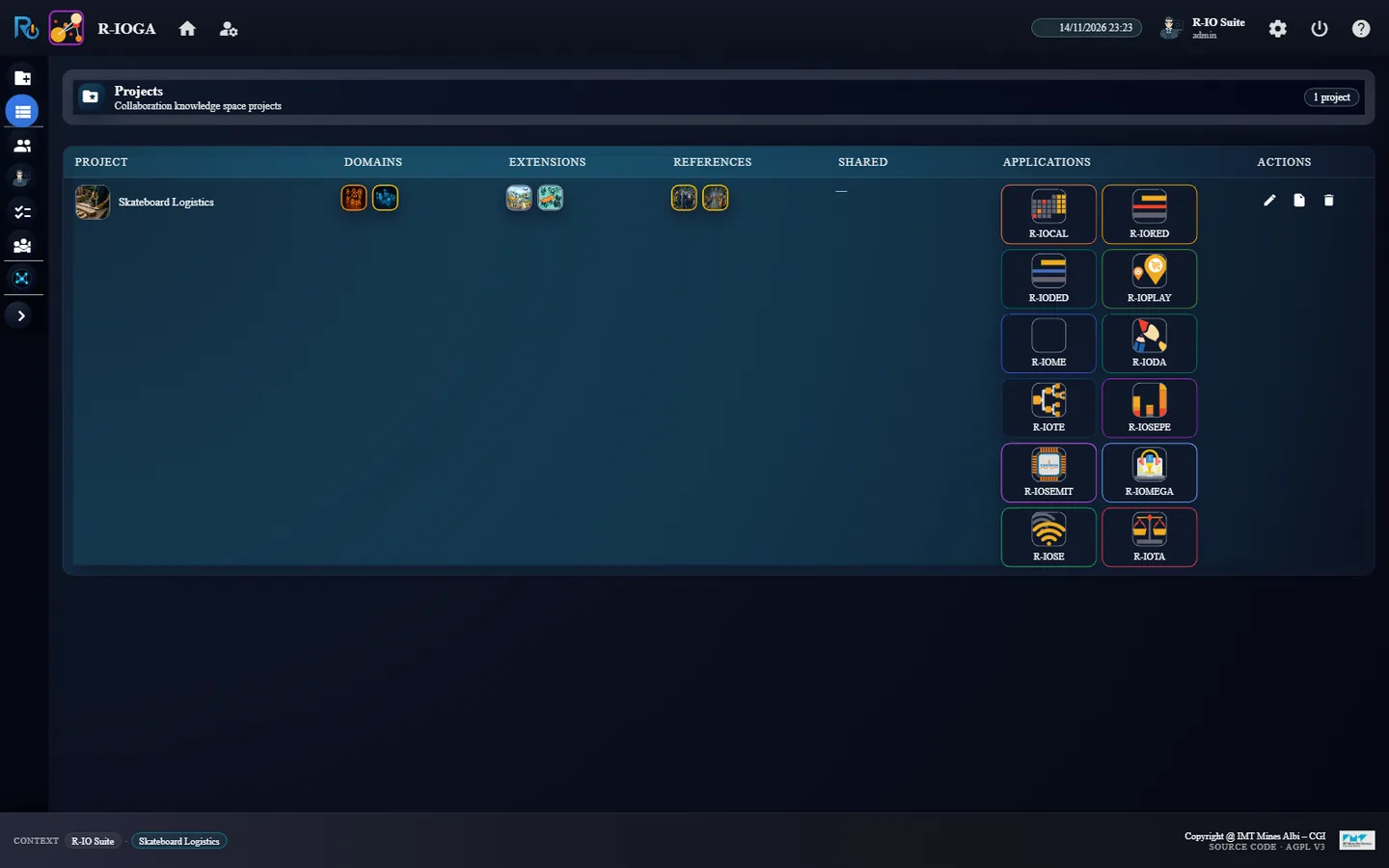
In r-ioga, Projects workspace, click the card Skateboard Logistics, then Load, and close the confirmation with OK.
From the APPLICATIONS column of Project List, open R-IOSE, R-IOTA and R-IOSEMIT, each in its own tab.
r-ioga: Skateboard Logistics loaded, the applications in Project List
ResultThe three applications open on the project Skateboard Logistics.
02 · Step
Start the stock sensors
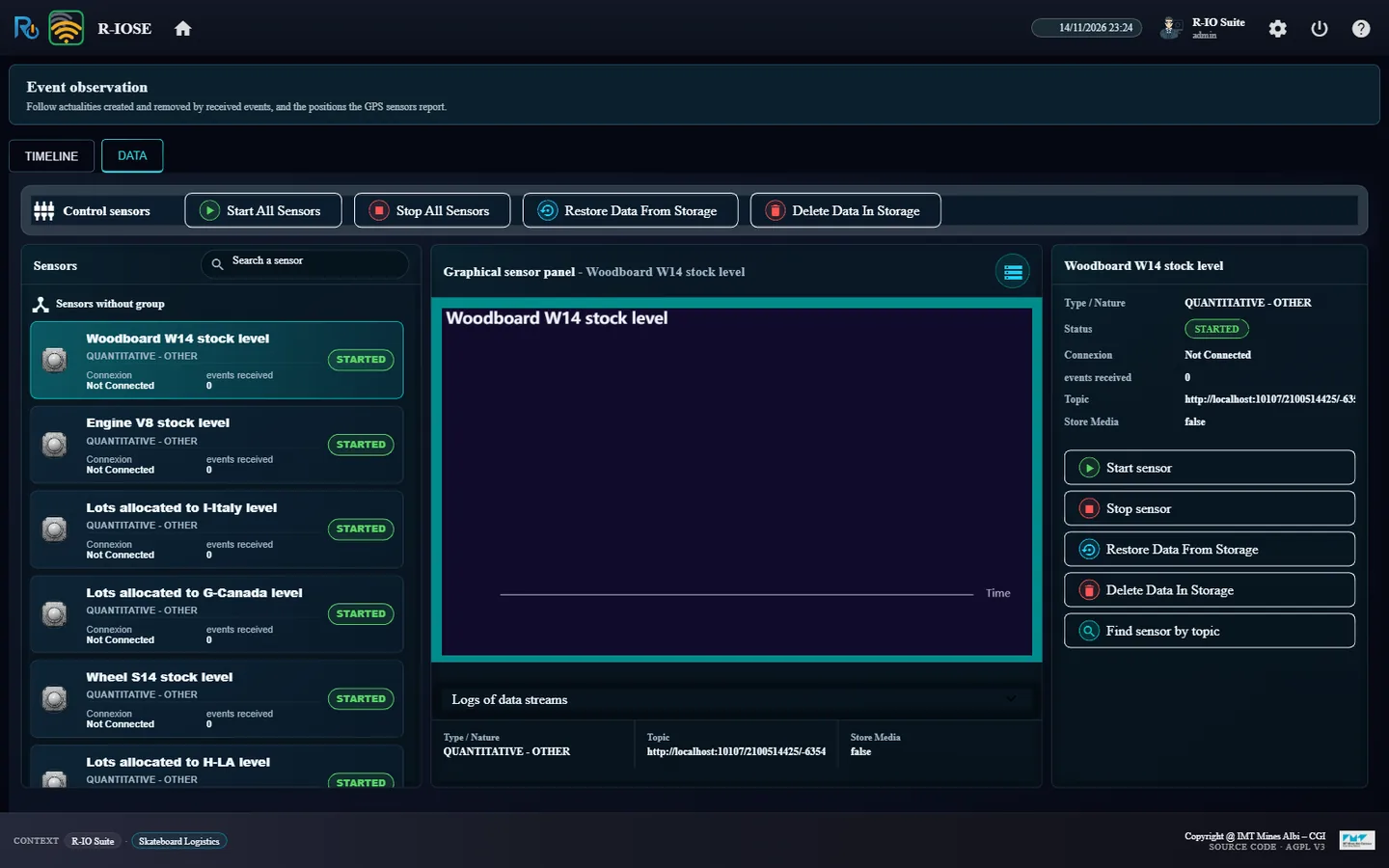
The workflow engine writes the stock levels; each level sensor only echoes the new value as a field event, which the CEP rules read to activate the deliveries. A sensor that is not started emits nothing: without this step, the lots leave the plant but no delivery is seen. Starting a sensor also writes its availability (Available, the default value of a Resource); the supervision counts a property absent from the plan as its default value, so this change raises no alert.
In r-iose, tab DATA, click Start All Sensors.
r-iose: the nine level sensors STARTED
ResultThe nine sensors (Engine V8 stock level, Battery B84 stock level, … Lots allocated to H-LA level) read STARTED.
03 · Step
Deduce the process from the orders
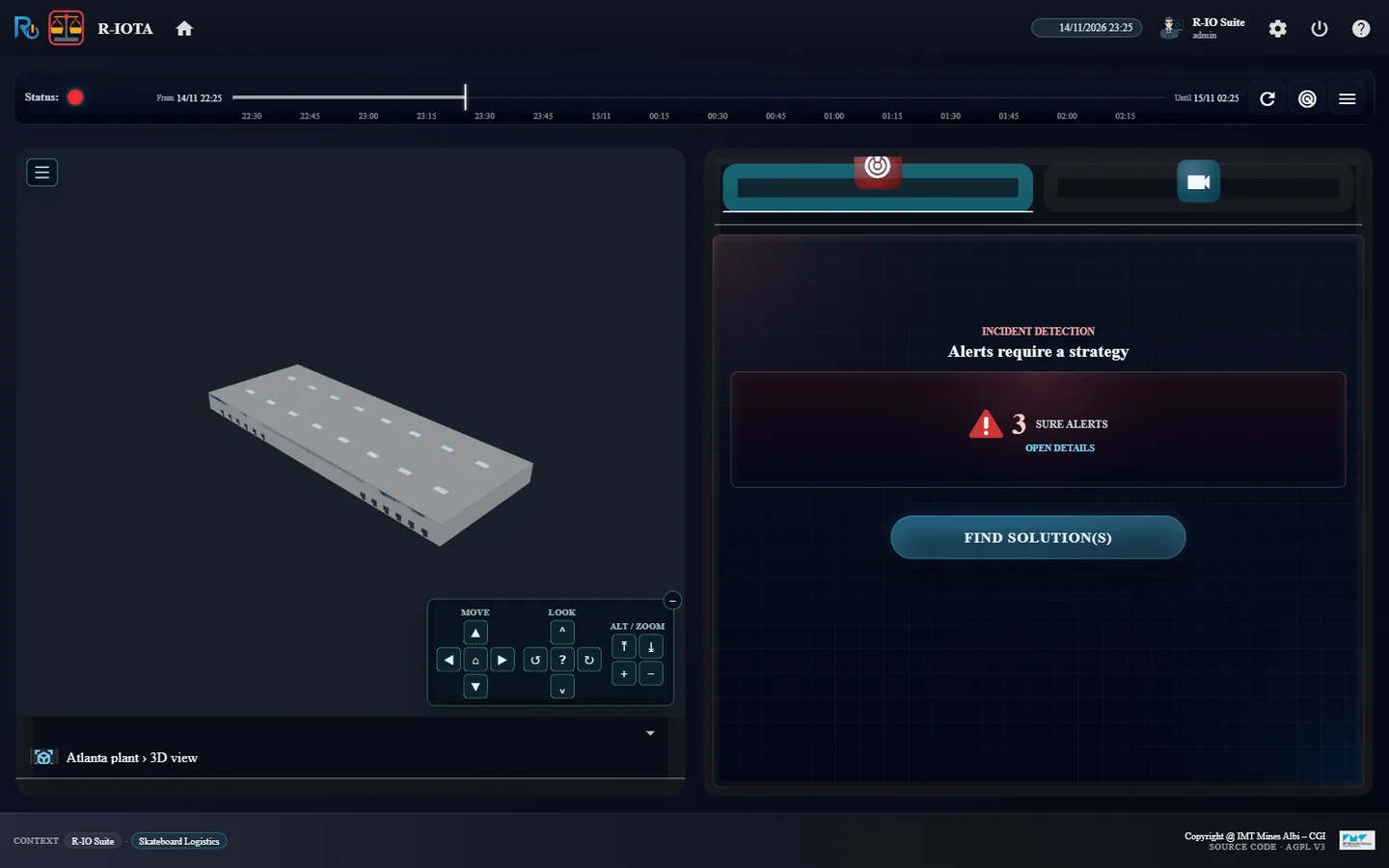
The three January orders of the customers (January order of H-LA (200 eSkates), of I-Italy (150 eSkates), of G-Canada (50 eSkates)) are active actualities: r-iota shows them as alerts, each treated by the objective Treat the January order of …. The deduction starts from the demand of each order and climbs through the stocks: shipping needs lots, a lot is packaged from 50 eSkates, an eSkate is made from the four component stocks, and those stocks are filled by the supplier orders. It also computes how many times each function must run.
In r-iota, click FIND SOLUTION(S).
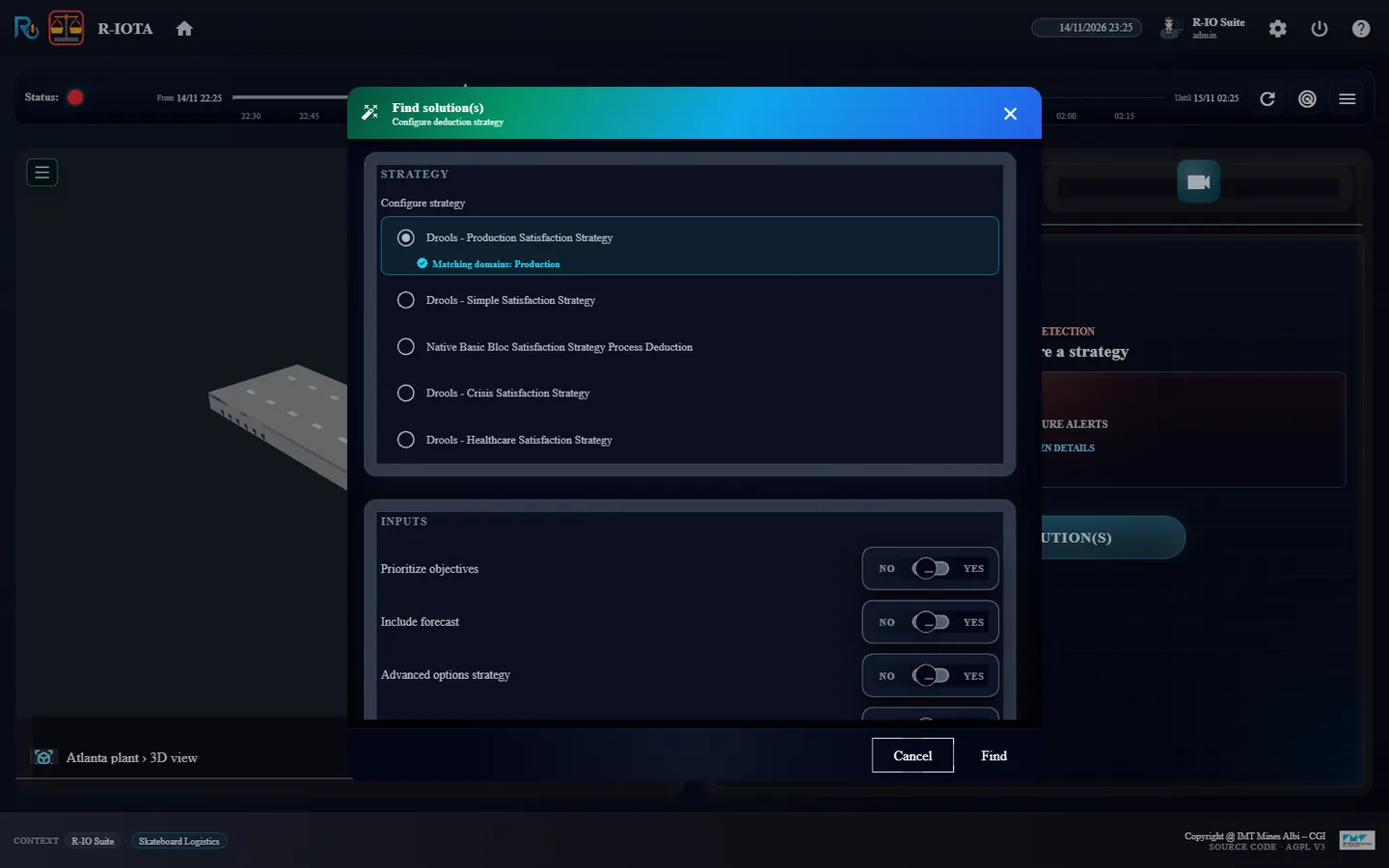
In the dialog, keep the deduction strategy Drools Production and click Find.
r-iota: the three orders, 3 sure alertsThe Find dialog with the Drools Production strategy
Resultr-iota shows 3 SURE ALERTS; the Find dialog lists the three objectives to satisfy.
04 · Step
Review the solution: one shared chain, stocks in the flow
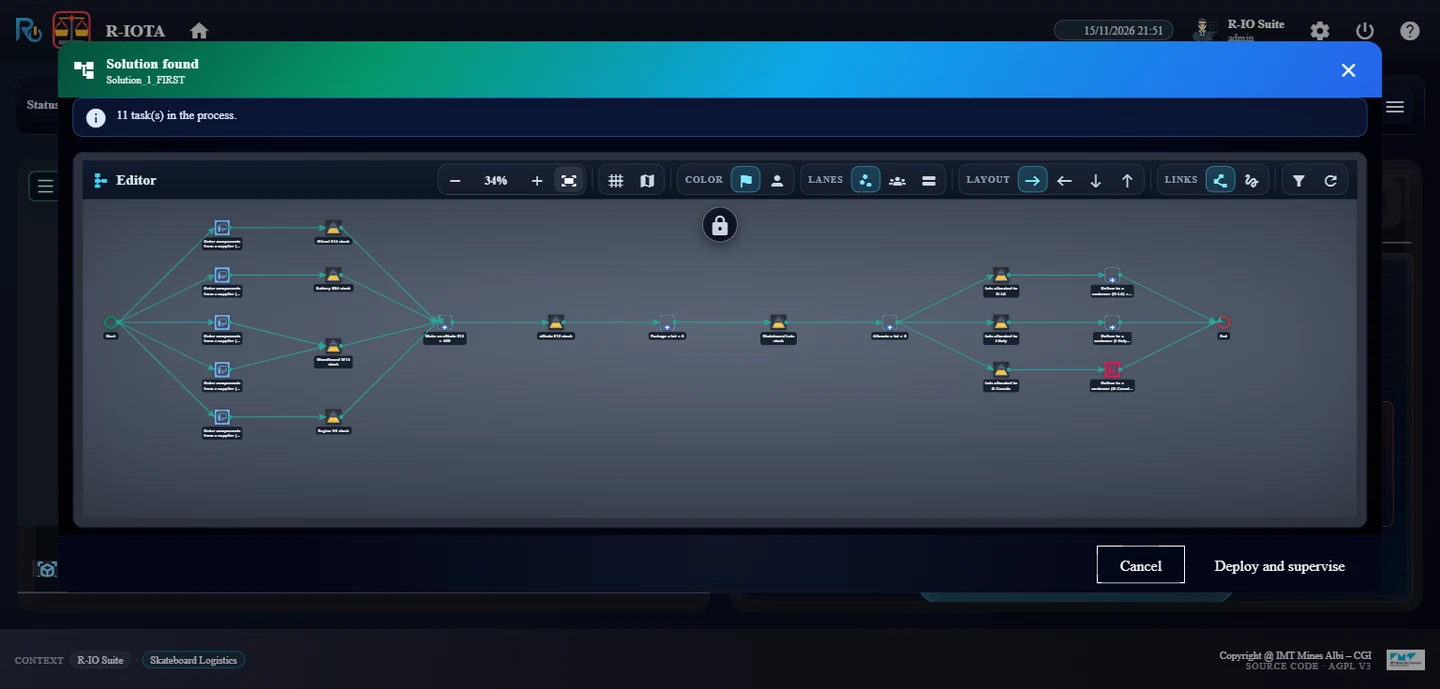
The three orders share one production chain: the components are ordered once from the five supplier functions (Order components from a supplier (B-Florida) … (F-Sweden)), one loop makes the eSkates of the three orders, one loop packages them in lots of 50 and one loop allocates the lots to the stocks of the customers. The chain then forks into one Deliver to a customer per customer. Allocate a lot requires no partner: the machine which provides it, Allocation system 1, chooses at each run the customer stock which gets the lot, after its allocation strategy property: Round robin (the default, one lot to each customer in turn) or First come, first served (the order activated first gets all its lots, then the next). The strategy is read at each lot: a change applies to the next lots. A customer order with no stock of lots belonging to that customer (Belongs_To) makes the deduction fail with a message naming the customer. The stocks sit in the flow between the task that fills them and the task that takes from them, drawn as triangles with their minimum and maximum thresholds.
Read the review: Solution found, Solution_1_FIRST. Zoom out to follow the chain.
Solution_1_FIRST: 11 tasks, the five supplier orders, Make an eSkate E12 × 400, Package a lot × 8 and Allocate a lot × 8 shared by the three orders, then one Deliver to a customer per customer
Result11 task(s) in the process: the five supplier orders, Make an eSkate E12 × 400 (200 + 150 + 50), Package a lot × 8, Allocate a lot × 8, then Deliver to a customer (H-LA) × 4, (I-Italy) × 3 and (G-Canada), one lot without a loop.
05 · Step
Deploy: the loop starts, then waits for the batteries
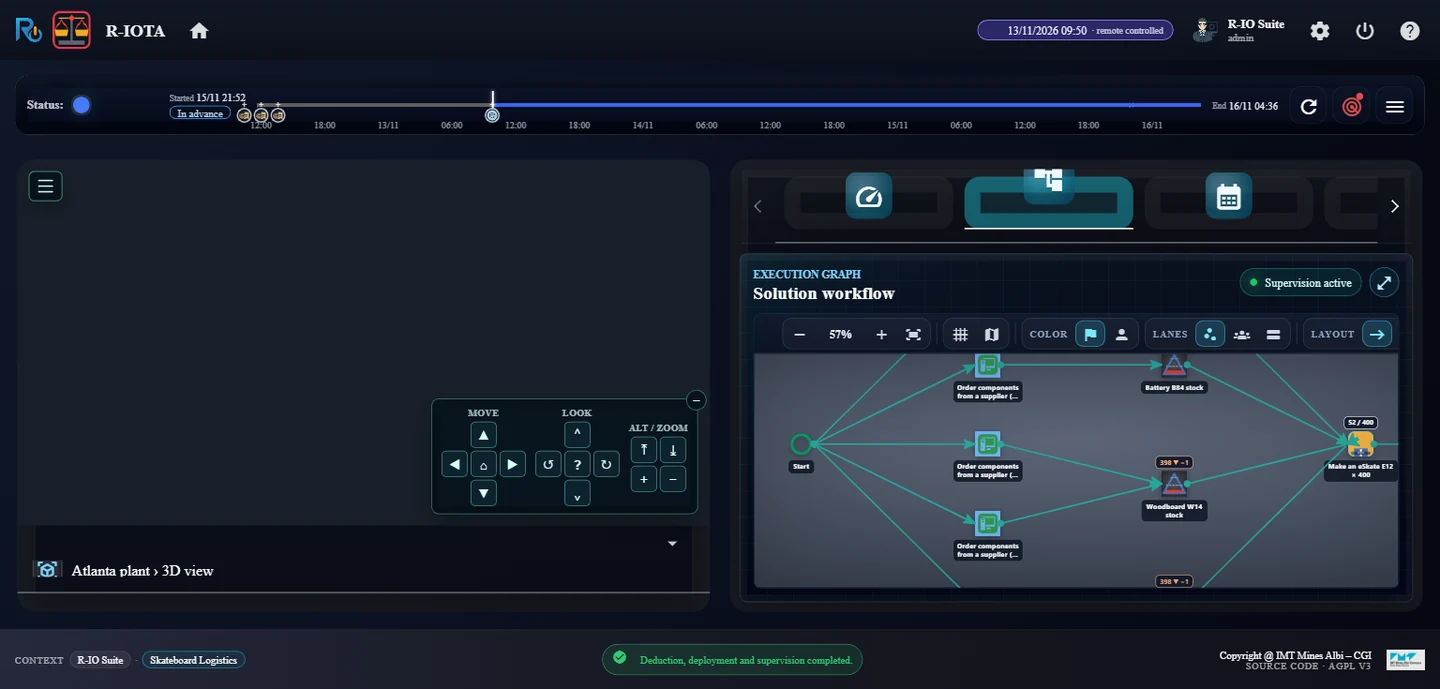
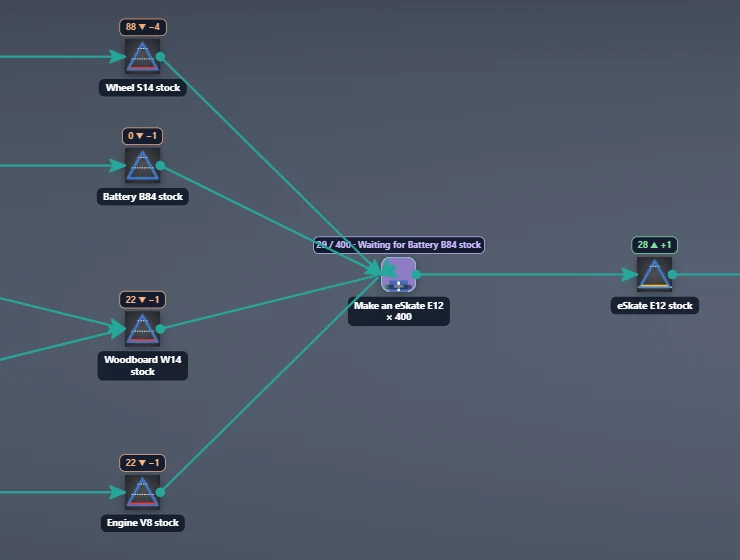
Each supplier order passes once. The Make loop takes from the component stocks: every iteration takes 4 wheels, 1 battery, 1 engine and 1 woodboard, all or nothing, and puts 1 eSkate in the eSkate E12 stock. The battery stock runs out first: the task that lacks a stock waits and its box turns violet.
Click Deploy and supervise.
Open the Process tab of the supervision and follow the Solution workflow.
r-iota: the solution deployed and supervisedMake an eSkate E12 × 400 waits: “Waiting for Battery B84 stock”, Battery B84 stock at 0 ▼ −1, 28 eSkates in the eSkate E12 stock
ResultThe orders are done (green); each stock shows its level and its last change (88 ▼ −4 for the wheels); the loop shows its counter and a progress bar, and waits with Waiting for Battery B84 stock while the battery stock is at 0.
06 · Step
Play the supplier receipts
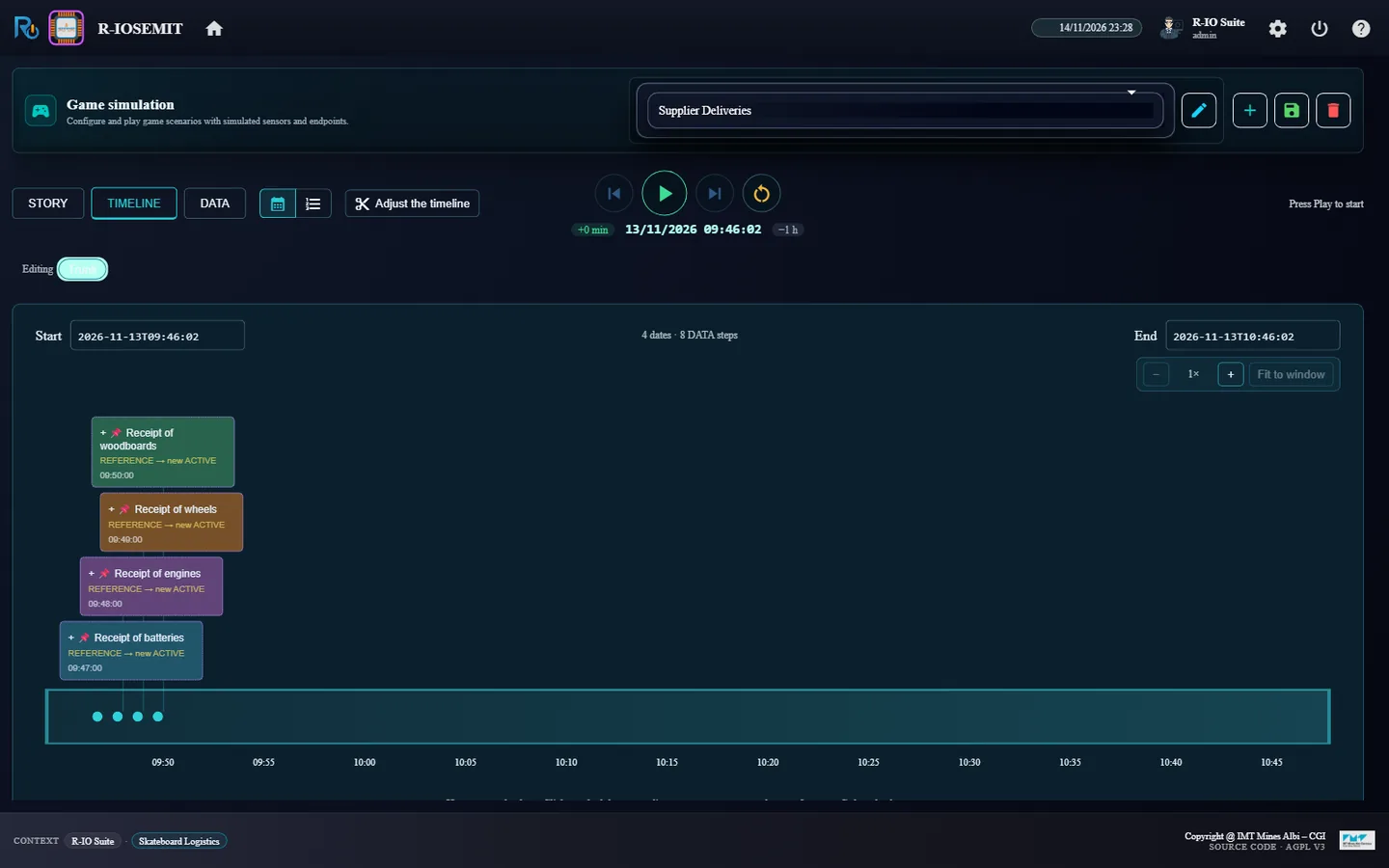
The scenario Supplier Deliveries of r-iosemit activates four receipts of the use case between 09:47 and 09:50, each with its quantity: batteries 500, engines 400, wheels 1600, woodboards 400. Each receipt says what it produces and into which stock (Wheel into the Wheel S14 stock, a Produces edge); r-io adds the quantity to that stock; the waiting loop starts again at once, without polling.
In r-iosemit, TIMELINE, choose the scenario Supplier Deliveries.
Click ▶, choose Continuous, speed ×60, tasks Auto, then Start.
r-iosemit: the four receipts of Supplier Deliveries, 09:47 to 09:50
ResultThe timeline reads 4 dates · 8 DATA steps; each receipt is a REFERENCE → new ACTIVE actuality.
07 · Step
Follow the loops and the stocks
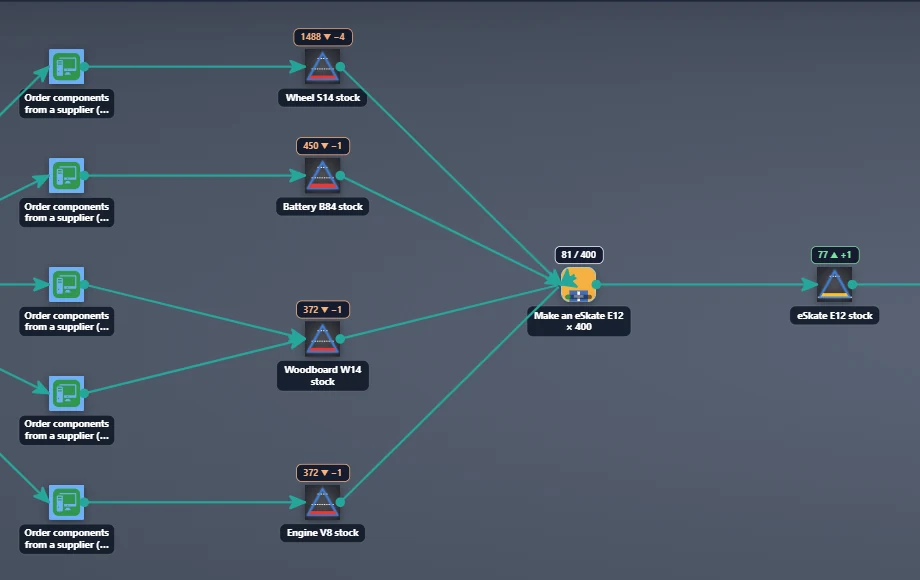
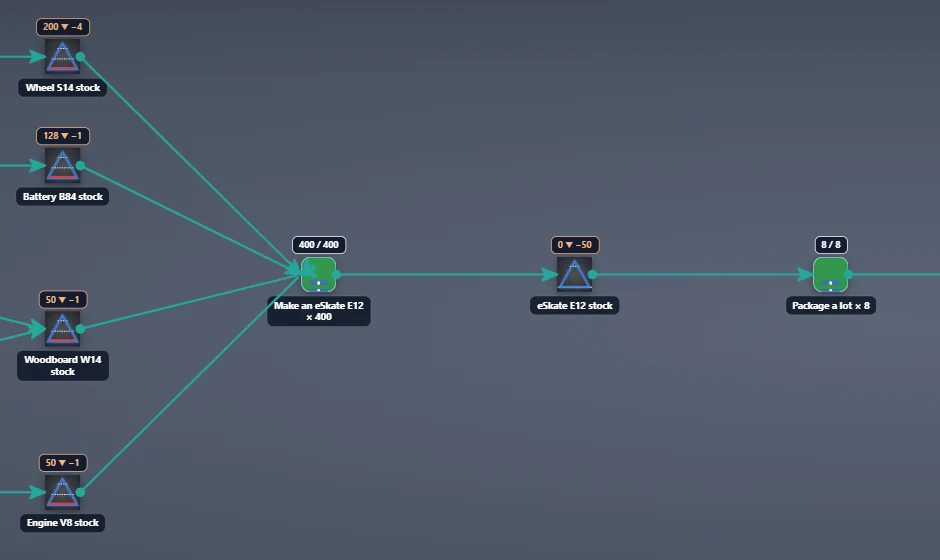
Each stock badge shows the level and its last change, live: ▼ when a task takes, ▲ when a task or a receipt puts. Hovering a stock shows the curve of its level since the deployment, with its thresholds. A loop stays orange until its last iteration.
In the Solution workflow, scroll from the stocks of components to the deliveries.
After the receipts: Battery B84 stock 450 ▼ −1, Make an eSkate E12 × 400 at 81 / 400, eSkate E12 stock 77 ▲ +1End of the production loops: Make an eSkate E12 × 400 at 400 / 400, eSkate E12 stock 0 ▼ −50, Package a lot × 8 at 8 / 8
ResultThe Make loop runs as fast as the stocks allow; the eSkate E12 stock rises one eSkate at a time; Package a lot starts when the Make loop has ended.
08 · Step
Package, allocate and ship
Each Package iteration takes 50 eSkates and puts one lot in Skateboard Lots stock; each Allocate moves a lot to the stock of the customer chosen by the machine (with Round robin: G-Canada, H-LA, I-Italy, then H-LA and I-Italy in turn); each Deliver to a customer takes a lot out of the plant. The level sensor of the customer lots echoes each fall, and its CEP rule activates a Delivery to … which consumes the fall in lots out of that stock (a Consumes edge). The supervision holds these deliveries as covered: they touch a stock of the running solution, so they raise no alert.
Let r-iosemit play to the end of the timeline.
In the Solution workflow, follow the chain to the three Deliver to a customer. When the three deliveries are over, the supervision ends by itself (No alert detected).
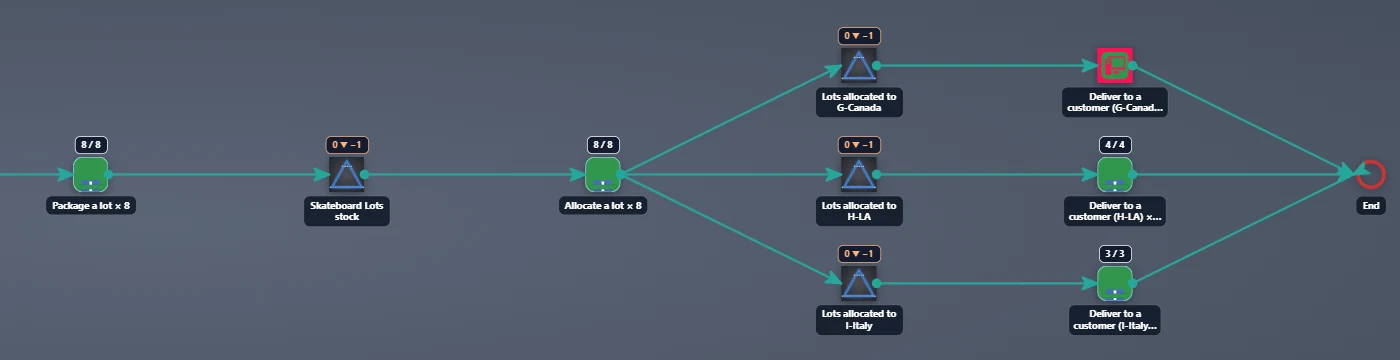
End of the process: Allocate a lot × 8 at 8 / 8, the three Lots allocated to … stocks at 0 ▼ −1, Deliver to a customer (H-LA) at 4 / 4 and (I-Italy) at 3 / 3, in green
ResultThe chain goes to the end: Make × 400, Package × 8, Allocate × 8, then Deliver × 1 / 3 / 4; the loops turn green with Iterations done N / N, and Delivery to G-Canada (1 lot), I-Italy (3) and H-LA (4) become active. The eSkate E12 stock ends at 0: the 400 eSkates made have all left in 8 lots. The supervision has kept all along the same status, Failing, Improvable, Uncovered, Wrong and Obsolete at 0 (Weighted Graph Distance): the run raises no alert.
Réceptions des fournisseurs : un processus piloté par les stocks
Trois commandes de clients apportent la demande. r-io déduit une seule chaîne de production pour les trois commandes, des commandes aux fournisseurs jusqu’aux livraisons, avec les stocks dans le flux et des boucles dimensionnées par la somme des commandes ; la machine d’attribution répartit les lots entre les clients. Une fois déployé, le moteur de workflow prend et pose les quantités : les boucles fabriquent les eSkates jusqu’à épuisement des batteries, puis attendent. Les réceptions des fournisseurs jouées par r-iosemit remplissent les stocks, les boucles repartent, et les lots sont emballés, attribués et expédiés aux trois clients.
Ce que montre ce scénario
Les stocks pilotent le processus. La déduction remonte de la demande à travers les stocks et dimensionne les boucles ; le moteur est seul à écrire les niveaux et fait attendre une tâche tant qu’un stock manque ; une réception ajoute sa quantité à son stock ; les livraisons sont les baisses des stocks de lots vues par le CEP ; la supervision montre en direct les niveaux, les compteurs et les attentes.
01 · Étape
Charger le cas d’usage et ouvrir les applications
Skateboard Logistics modélise A-Atlanta, qui assemble des eSkates dans son usine d’Atlanta (la référence produit eSkate E12, dont la nomenclature prend 4 × Wheel S14, 1 × Battery B84, 1 × Engine V8 et 1 × Woodboard W14 : des lignes From Product sur des références du catalogue, pas des biens), cinq fournisseurs de B à F et trois clients dont les commandes portent la demande : H-LA 200, I-Italy 150 et G-Canada 50 eSkates, chacune une ligne From Product sur eSkate E12 que la déduction convertit en lots de 50 (4, 3 et 1 lots). A-Atlanta fabrique (Makes) et livre (Delivers) le pack eSkate E12 lot of 50, chaque fournisseur livre (Delivers) ses composants. L’usine compte neuf stocks, chacun avec un capteur de niveau. Partir d’un r-io neuf : un run prend dans les stocks et les remplit, et les stocks du cas d’usage ne reviennent à leur niveau qu’au rechargement.
Dans r-ioga, Projects workspace, cliquer la carte Skateboard Logistics, puis Load, et fermer la confirmation par OK.
Depuis la colonne APPLICATIONS de Project List, ouvrir R-IOSE, R-IOTA et R-IOSEMIT, chacune dans son onglet.
r-ioga : Skateboard Logistics chargé, les applications dans Project List
RésultatLes trois applications s’ouvrent sur le projet Skateboard Logistics.
02 · Étape
Démarrer les capteurs des stocks
Le moteur de workflow écrit les niveaux des stocks ; chaque capteur de niveau ne fait que renvoyer la nouvelle valeur comme un événement du terrain, que les règles CEP lisent pour activer les livraisons. Un capteur non démarré n’émet rien : sans cette étape, les lots quittent l’usine mais aucune livraison n’est vue. Démarrer un capteur écrit aussi son availability (Available, la valeur par défaut d’une Resource) ; la supervision compte une propriété absente du plan comme sa valeur par défaut, ce changement ne lève donc aucune alerte.
Dans r-iose, onglet DATA, cliquer Start All Sensors.
Les trois commandes de janvier des clients (January order of H-LA (200 eSkates), d’I-Italy (150 eSkates), de G-Canada (50 eSkates)) sont des actualités actives : r-iota les montre en alertes, chacune traitée par l’objectif Treat the January order of …. La déduction part de la demande de chaque commande et remonte les stocks : expédier demande des lots, un lot s’emballe à partir de 50 eSkates, un eSkate se fabrique à partir des quatre stocks de composants, et ces stocks sont remplis par les commandes aux fournisseurs. Elle calcule aussi combien de fois chaque fonction doit tourner.
Dans r-iota, cliquer FIND SOLUTION(S).
Dans la boîte, garder la stratégie de déduction Drools Production et cliquer Find.
r-iota : les trois commandes, 3 alertes sûresLa boîte Find avec la stratégie Drools Production
Résultatr-iota affiche 3 SURE ALERTS ; la boîte Find liste les trois objectifs à satisfaire.
04 · Étape
Revoir la solution : une chaîne commune, les stocks dans le flux
Les trois commandes partagent une seule chaîne de production : les composants sont commandés une fois par les cinq fonctions fournisseurs (Order components from a supplier (B-Florida) … (F-Sweden)), une boucle fabrique les eSkates des trois commandes, une boucle les emballe par lots de 50 et une boucle attribue les lots aux stocks des clients. La chaîne se sépare ensuite en un Deliver to a customer par client. Allocate a lot ne requiert aucun partenaire : la machine qui la fournit, Allocation system 1, choisit à chaque passage le stock client qui reçoit le lot, selon sa propriété allocation strategy : Round robin (par défaut, un lot à chaque client à tour de rôle) ou First come, first served (la commande activée la première reçoit tous ses lots, puis la suivante). La stratégie est lue à chaque lot : un changement s’applique aux lots suivants. Une commande client sans stock de lots appartenant à ce client (Belongs_To) fait échouer la déduction, avec un message qui nomme le client. Les stocks sont placés dans le flux entre la tâche qui les remplit et celle qui y prend, dessinés en triangles avec leurs seuils minimum et maximum.
Lire la revue : Solution found, Solution_1_FIRST. Dézoomer pour suivre la chaîne.
Solution_1_FIRST : 11 tâches, les cinq commandes fournisseurs, Make an eSkate E12 × 400, Package a lot × 8 et Allocate a lot × 8 communs aux trois commandes, puis un Deliver to a customer par client
Résultat11 task(s) in the process : les cinq commandes fournisseurs, Make an eSkate E12 × 400 (200 + 150 + 50), Package a lot × 8, Allocate a lot × 8, puis Deliver to a customer (H-LA) × 4, (I-Italy) × 3 et (G-Canada), un lot sans boucle.
05 · Étape
Déployer : la boucle démarre, puis attend les batteries
Chaque commande fournisseur passe une fois. La boucle Make prend dans les stocks de composants : chaque itération prend 4 roues, 1 batterie, 1 moteur et 1 planche, tout ou rien, et pose 1 eSkate dans le stock eSkate E12. Le stock de batteries s’épuise le premier : la tâche à qui il manque un stock attend et sa boîte devient violette.
Cliquer Deploy and supervise.
Ouvrir l’onglet Process de la supervision et suivre le Solution workflow.
r-iota : la solution déployée et superviséeMake an eSkate E12 × 400 attend : « Waiting for Battery B84 stock », Battery B84 stock à 0 ▼ −1, 28 eSkates dans le stock eSkate E12
RésultatLes commandes sont faites (vert) ; chaque stock affiche son niveau et son dernier écart (88 ▼ −4 pour les roues) ; la boucle affiche son compteur et une barre d’avancement, et attend avec Waiting for Battery B84 stock tant que le stock de batteries est à 0.
06 · Étape
Jouer les réceptions des fournisseurs
Le scénario Supplier Deliveries de r-iosemit active quatre réceptions du cas d’usage entre 09:47 et 09:50, chacune avec sa quantité : batteries 500, moteurs 400, roues 1600, planches 400. chaque réception dit ce qu’elle produit et dans quel stock (Wheel dans le Wheel S14 stock, une arête Produces) ; r-io ajoute la quantité à ce stock ; la boucle en attente repart aussitôt, sans scrutation.
Dans r-iosemit, TIMELINE, choisir le scénario Supplier Deliveries.
Cliquer ▶, choisir Continuous, vitesse ×60, tâches Auto, puis Start.
r-iosemit : les quatre réceptions de Supplier Deliveries, de 09:47 à 09:50
RésultatLa frise affiche 4 dates · 8 DATA steps ; chaque réception est une actualité REFERENCE → new ACTIVE.
07 · Étape
Suivre les boucles et les stocks
La pastille de chaque stock affiche le niveau et son dernier écart, en direct : ▼ quand une tâche prend, ▲ quand une tâche ou une réception pose. Le survol d’un stock montre la courbe de son niveau depuis le déploiement, avec ses seuils. Une boucle reste orange jusqu’à sa dernière itération.
Dans le Solution workflow, défiler des stocks de composants jusqu’aux livraisons.
Après les réceptions : Battery B84 stock 450 ▼ −1, Make an eSkate E12 × 400 à 81 / 400, eSkate E12 stock 77 ▲ +1Fin des boucles de production : Make an eSkate E12 × 400 à 400 / 400, eSkate E12 stock 0 ▼ −50, Package a lot × 8 à 8 / 8
RésultatLa boucle Make avance au rythme des stocks ; le stock eSkate E12 monte d’un eSkate à la fois ; Package a lot démarre quand la boucle Make est finie.
08 · Étape
Emballer, attribuer et expédier
Chaque itération de Package prend 50 eSkates et pose un lot dans Skateboard Lots stock ; chaque Allocate déplace un lot vers le stock du client choisi par la machine (en Round robin : G-Canada, H-LA, I-Italy, puis H-LA et I-Italy à tour de rôle) ; chaque Deliver to a customer sort un lot de l’usine. Le capteur de niveau des lots du client renvoie chaque baisse, et sa règle CEP active un Delivery to … qui consomme la baisse en lots dans ce stock (une arête Consumes). La supervision tient ces livraisons pour couvertes : elles touchent un stock de la solution en cours, elles ne lèvent donc aucune alerte.
Laisser r-iosemit jouer jusqu’au bout de la frise.
Dans le Solution workflow, suivre la chaîne jusqu’aux trois Deliver to a customer. Quand les trois livraisons sont finies, la supervision s’arrête d’elle-même (No alert detected).
Fin du processus : Allocate a lot × 8 à 8 / 8, les trois stocks Lots allocated to … à 0 ▼ −1, Deliver to a customer (H-LA) à 4 / 4 et (I-Italy) à 3 / 3, en vert
RésultatLa chaîne va au bout : Make × 400, Package × 8, Allocate × 8, puis Deliver × 1 / 3 / 4 ; les boucles passent au vert avec Iterations done N / N, et Delivery to G-Canada (1 lot), I-Italy (3) et H-LA (4) deviennent actives. Le stock eSkate E12 finit à 0 : les 400 eSkates fabriqués sont tous partis en 8 lots. La supervision a gardé tout du long le même état, Failing, Improvable, Uncovered, Wrong et Obsolete à 0 (Weighted Graph Distance) : le run ne lève aucune alerte.