The Vigicrues forecasts are switched off: r-io only knows the measures of the Loire. At 18:00 the level (4.1 m) brings the flood risk of the George-V bridge to 80 % and r-iota raises an alert. The deduction plans the preventive closure of the bridge with the corrective procedure as its recovery. The flood comes at 20:00, while the bridge is still being closed: the preventive cannot be completed, the corrective takes over, and its waits last from 6 to 24 hours because nothing tells r-io when the flood will recede.
What this act demonstrates
Without forecast, r-io reacts to the measures only. The preventive procedure (close the bridge before the flood) and the corrective one (secure, wait, inspect, reopen) are both deduced; the corrective is a recovery that starts only if the flood comes. Here it comes too early: the corrective takes over the preventive objective, the preventive tasks not started are abandoned, those already done are marked done. The waits keep their modelled interval of 6 to 24 hours: their end is “not yet known”.
01 · Step
Load the use case and open the applications
Orleans Flood Crisis models the George-V bridge, its tram line, its quay, the people who close and inspect it, and a water level sensor of the Loire whose CEP rules drive the risk and the flood. Each act starts from a fresh r-io: restart the distribution and load the use case again. The actors booked by a previous act would otherwise stay booked on the same dates.
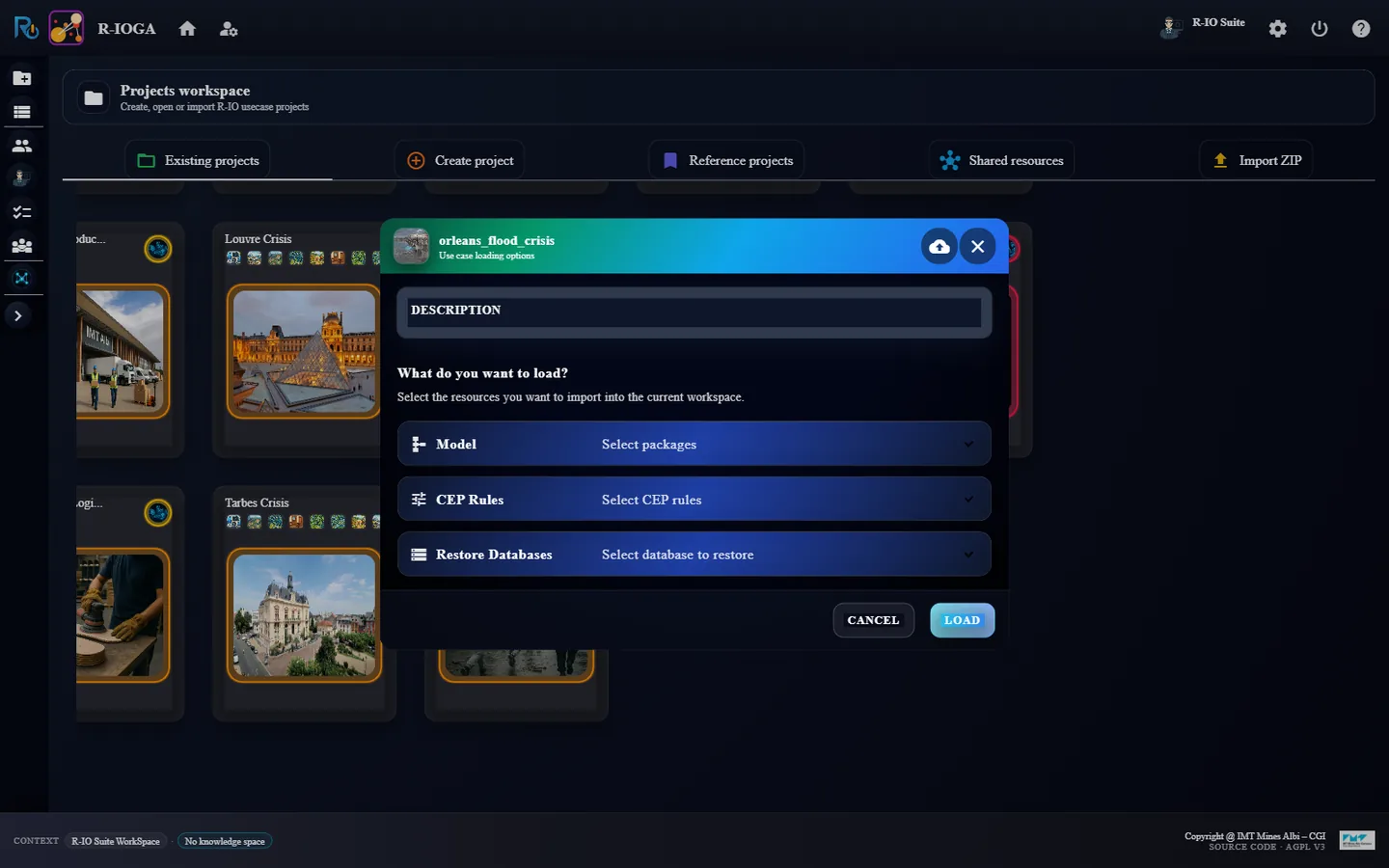
In r-ioga, Projects workspace, click the card Orleans Flood Crisis, then Load.
Close Use-case successfully loaded !!! with OK: r-ioga opens Project List.
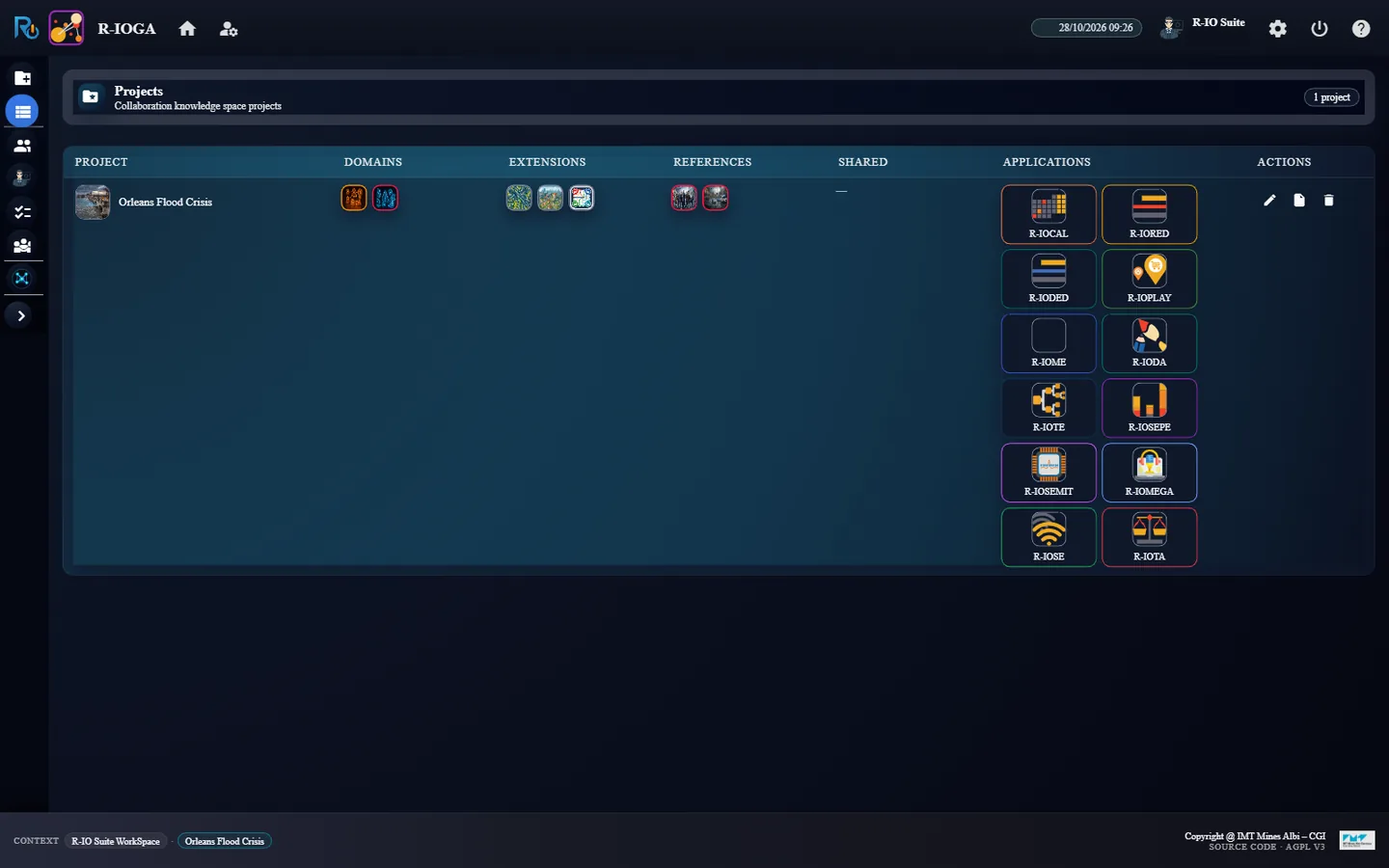
From the APPLICATIONS column, open R-IOSEMIT and R-IOTA, each in its own tab.
r-ioga: the loading options of Orleans Flood CrisisProject List: the launchers of the applications
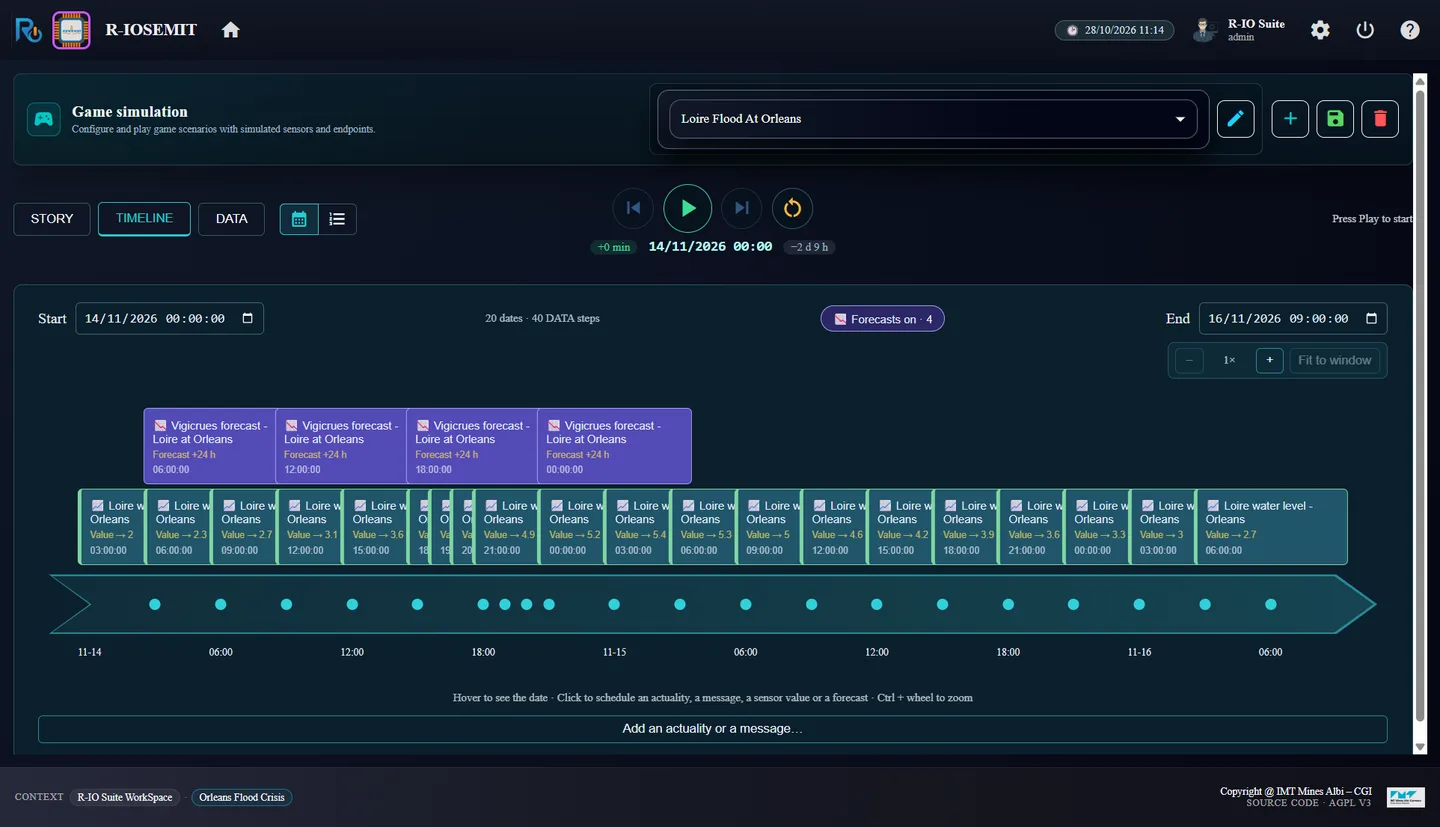
Resultr-iosemit shows the scenario Loire Flood At Orleans: 20 dates · 40 DATA steps, Forecasts on · 4; r-iota shows No alert detected !!!.
02 · Step
Switch the forecasts off
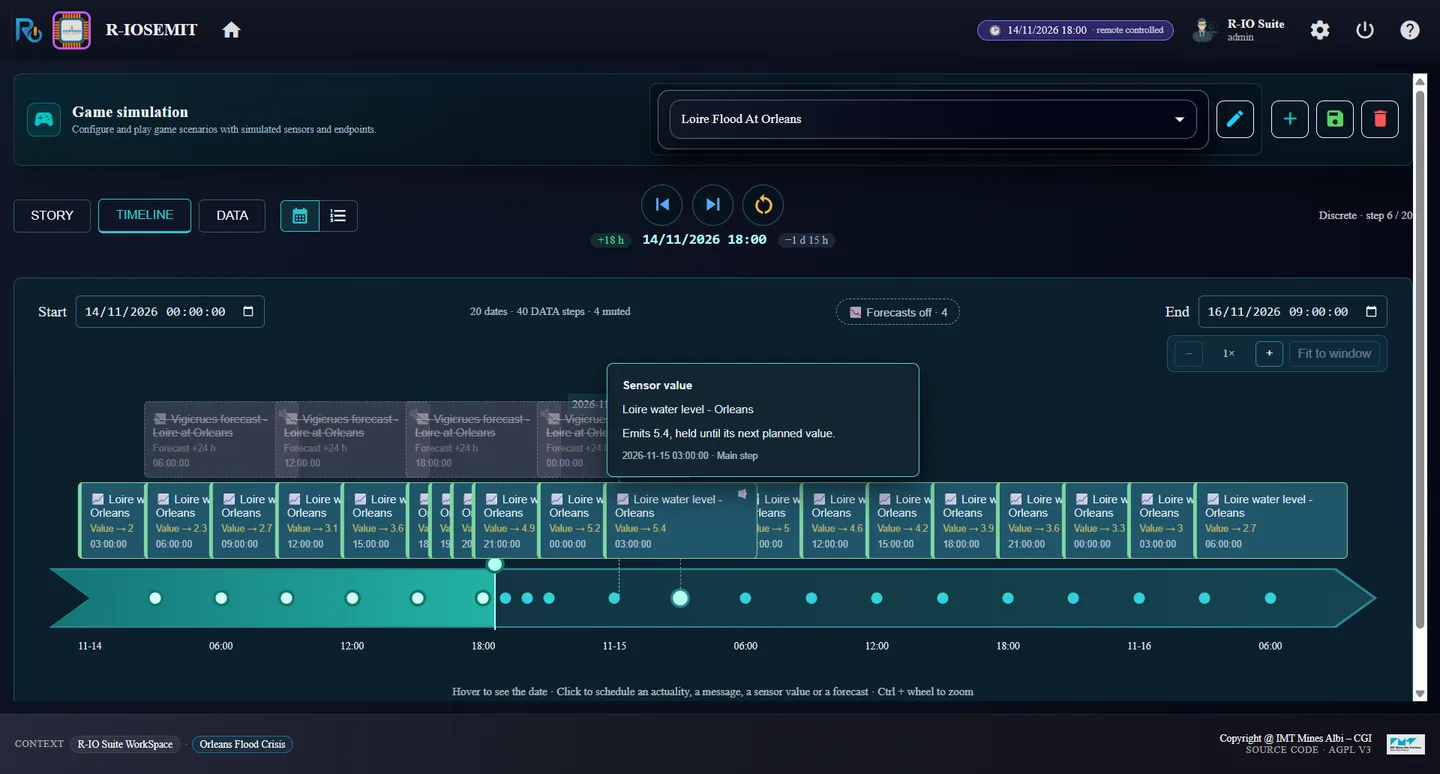
The timeline holds two tracks: the measures of the sensor (every 3 h) and four forecasts of Vigicrues (06:00, 12:00, 18:00 and 00:00, each over 24 h). In this act r-io must not receive any forecast.
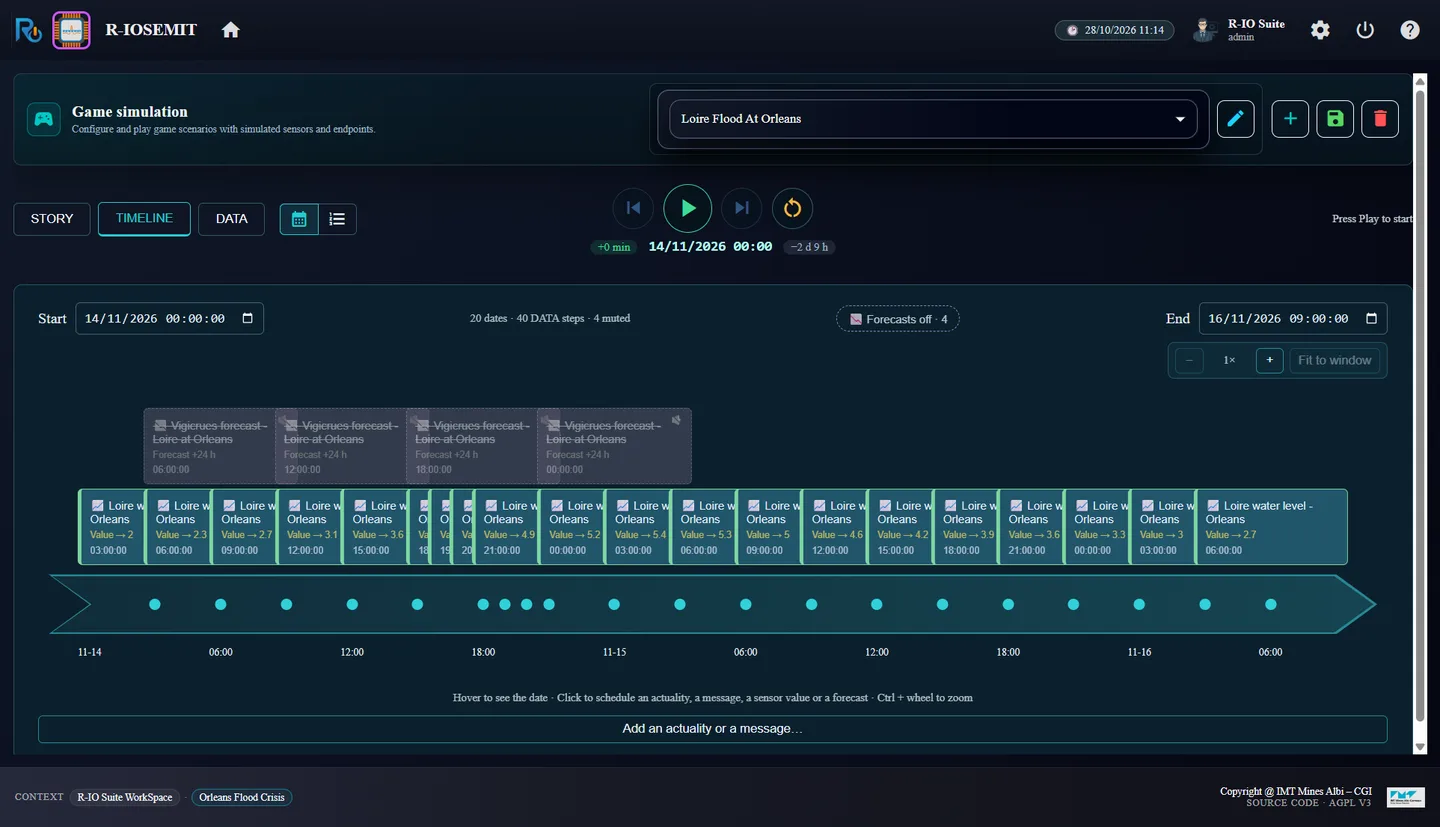
In r-iosemit, TIMELINE, click the purple button 📉 Forecasts on · 4.
Before: the 4 Vigicrues forecasts above the measures, “Forecasts on · 4”After: “Forecasts off · 4”, the forecasts struck through, “4 muted”
ResultThe button reads Forecasts off · 4, the four forecast cards are greyed and struck through, and the counter reads 20 dates · 40 DATA steps · 4 muted: they will not be played.
03 · Step
Play the measures until 18:00
Each Next step plays one date. The level goes 2 → 2.3 → 2.7 → 3.1 → 3.6 → 4.1 m; each threshold crossed raises the probability of the risk (0.2, 0.5, 0.8). At 0.8 the risk becomes an alert.
Click Next step six times, waiting each time for the counter, until 14/11/2026 18:00 (step 6 / 20).
In r-iota, read the alert, then open the Forecast tab (second tab).
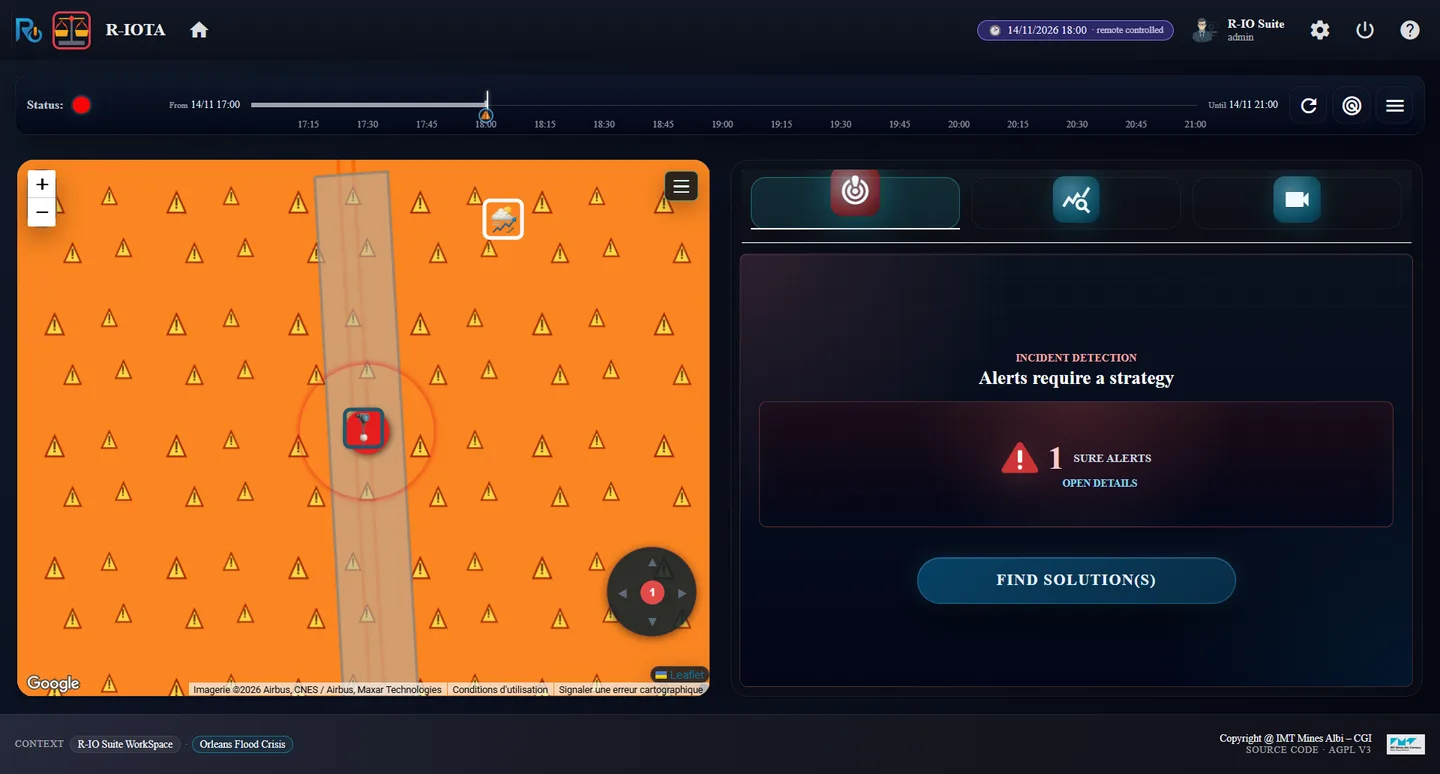
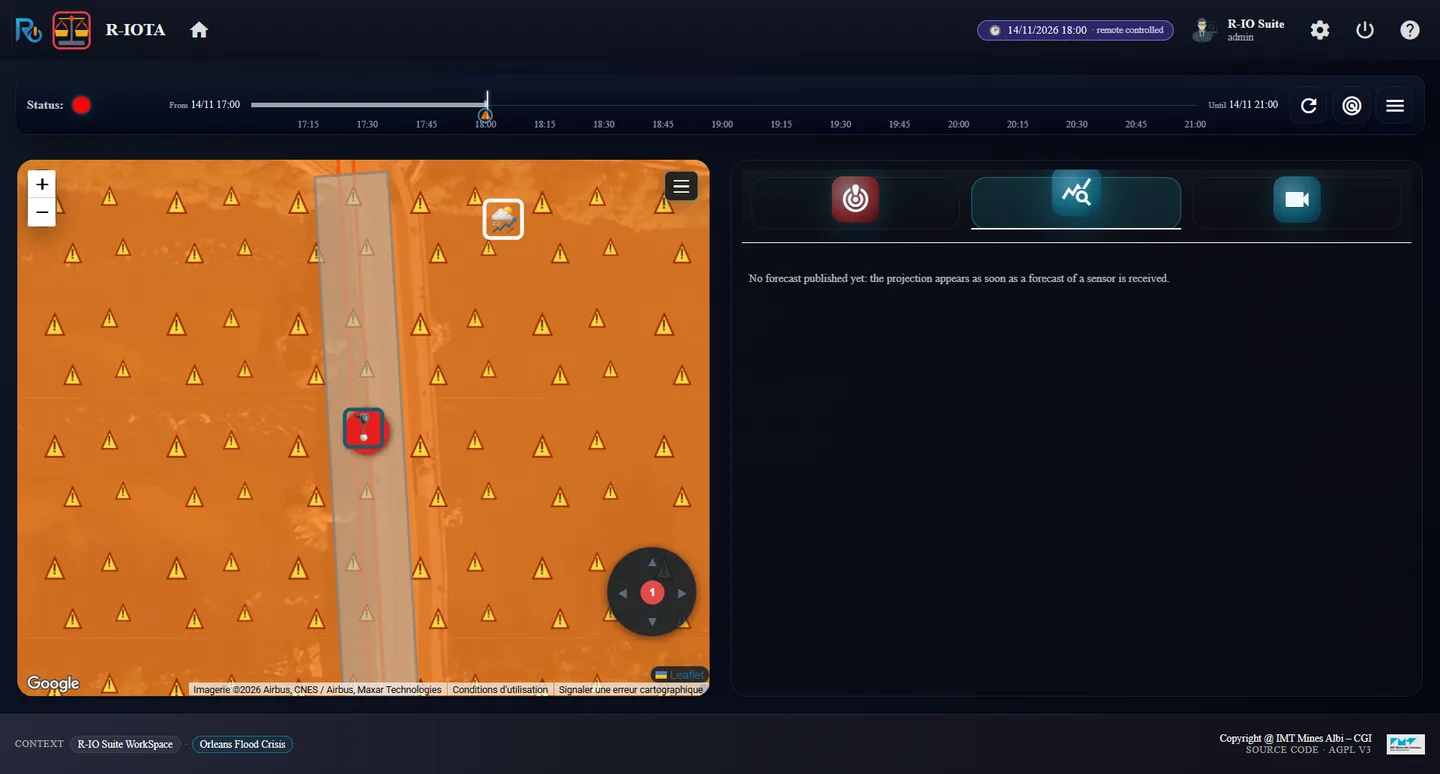
r-iosemit at 18:00, step 6: the level at 4.1 mr-iota: 1 sure alert, the danger zone around the bridgeForecast tab: “No forecast published yet”
Resultr-iota shows 1 SURE ALERTS and a red status: George-V bridge flood risk at George-V bridge, prevented by Prevent the George-V bridge flood risk. The Forecast tab confirms the forecasts are off: No forecast published yet: the projection appears as soon as a forecast of a sensor is received. The supervision timeline stops at now: nothing is projected.
04 · Step
Deduce the preventive and the corrective
Without forecast, the deduction only knows that the risk is at 80 %: it plans to prevent it, and keeps the corrective procedure in reserve in case the flood comes anyway.
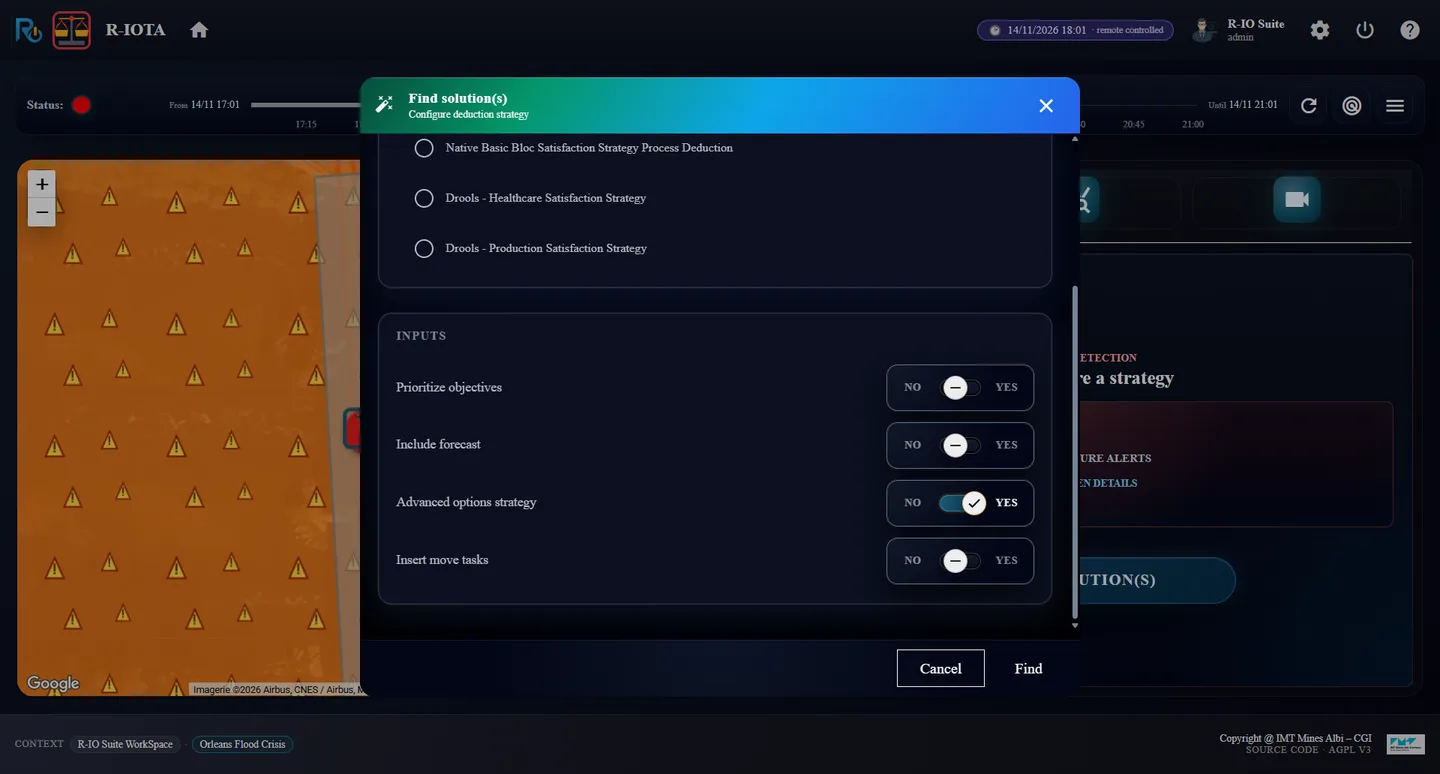
Click FIND SOLUTION(S): Include forecast stays at NO (no forecast was received). Set Advanced options strategy to YES and click Find.
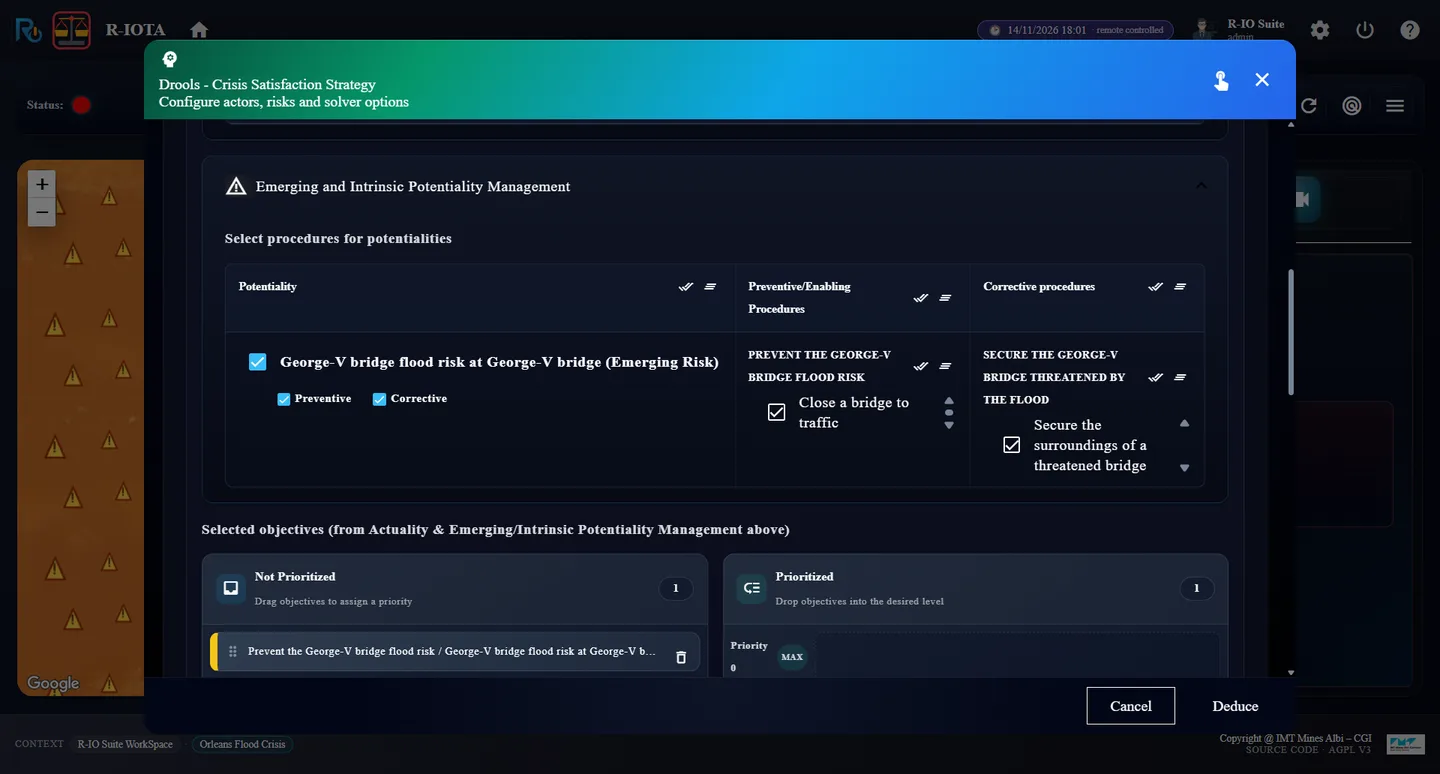
In Drools - Crisis Satisfaction Strategy, the risk has Preventive and Corrective checked: Close a bridge to traffic prevents it, Secure the surroundings of a threatened bridge treats the flood. Click Deduce.
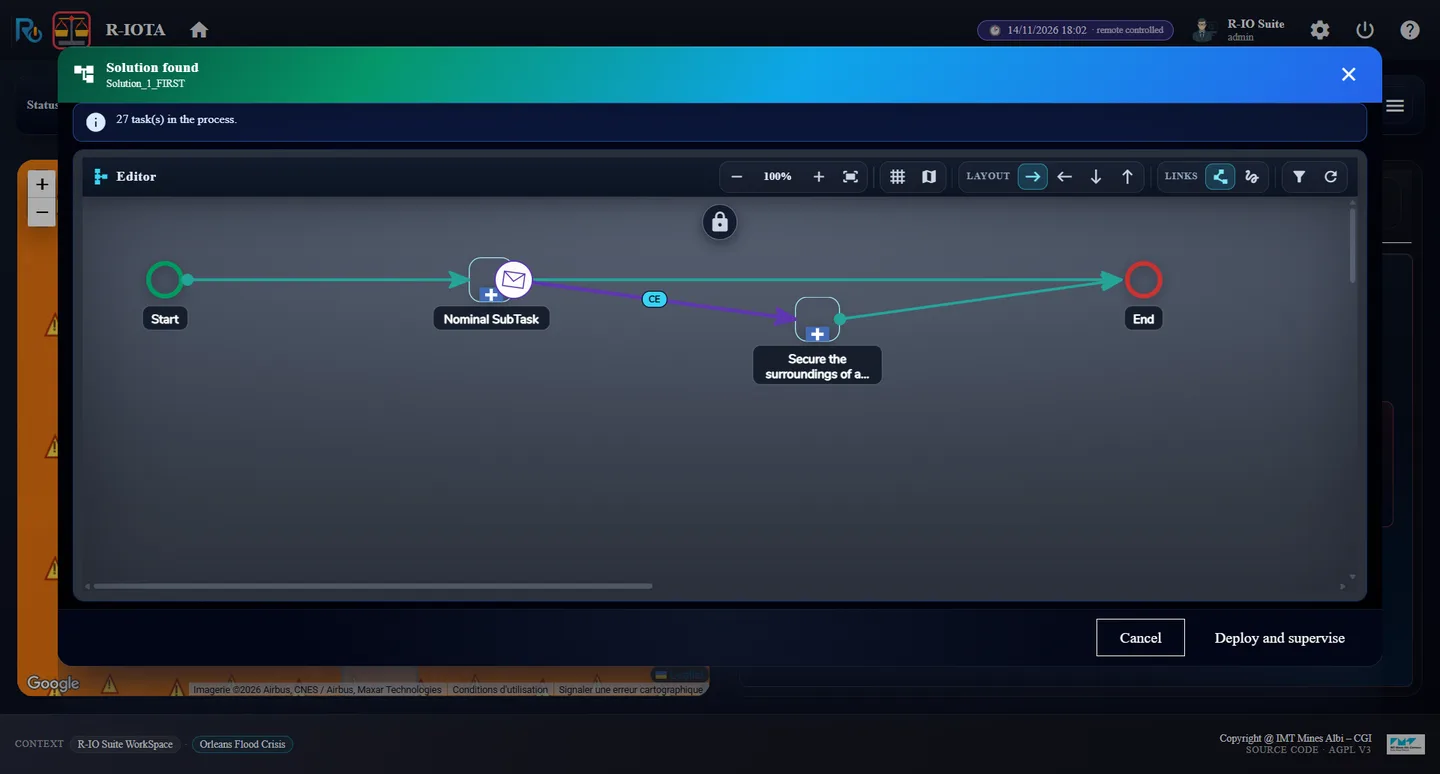
Read Solution found, then click Deploy and supervise.
Find solution(s): Include forecast NO, Advanced options strategy YESThe strategy: Preventive and Corrective checked for the riskSolution found: the Nominal SubTask (preventive) and its corrective recovery on an Event_Flow (CE)
Result27 task(s) in the process: Start → Nominal SubTask → End, and from the Nominal SubTask an Event_Flow (CE) towards Secure the surroundings of a threatened bridge, which only starts if the actuality Loire flood at George-V bridge appears.
05 · Step
Deploy and let the tasks run
r-iosemit can play the field: in Auto, each task is accepted as soon as the process reaches it and ends after its duration, moving the clock forward.
In r-iosemit, tab TASKS, check AUTO in the header of the situation George-V bridge flood risk at George-V bridge.
Watch the clock: Stop a tram line 18:02 → 18:18, then Close a bridge to traffic from 18:18, for 2 h 30.
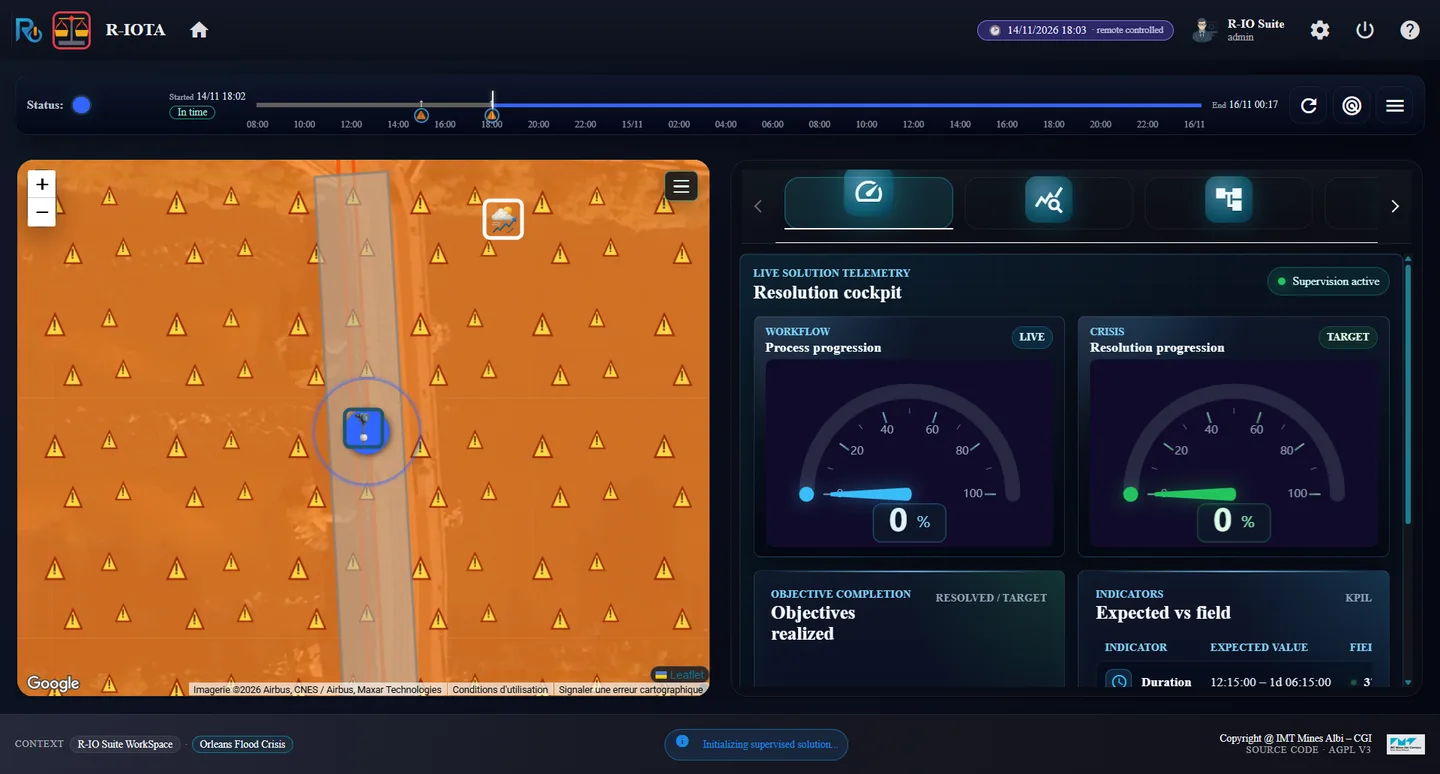
Deployed: the plan runs, Duration expected 12:15 – 1d 06:15
Resultr-iota shows total: 27, 0 / 2 objectives and a blue status. The expected duration of the plan is an interval, 12:15:00 – 1d 06:15:00: the waits of the corrective last from 6 to 24 hours.
06 · Step
The flood comes at 20:00: the preventive cannot be done, the corrective takes over
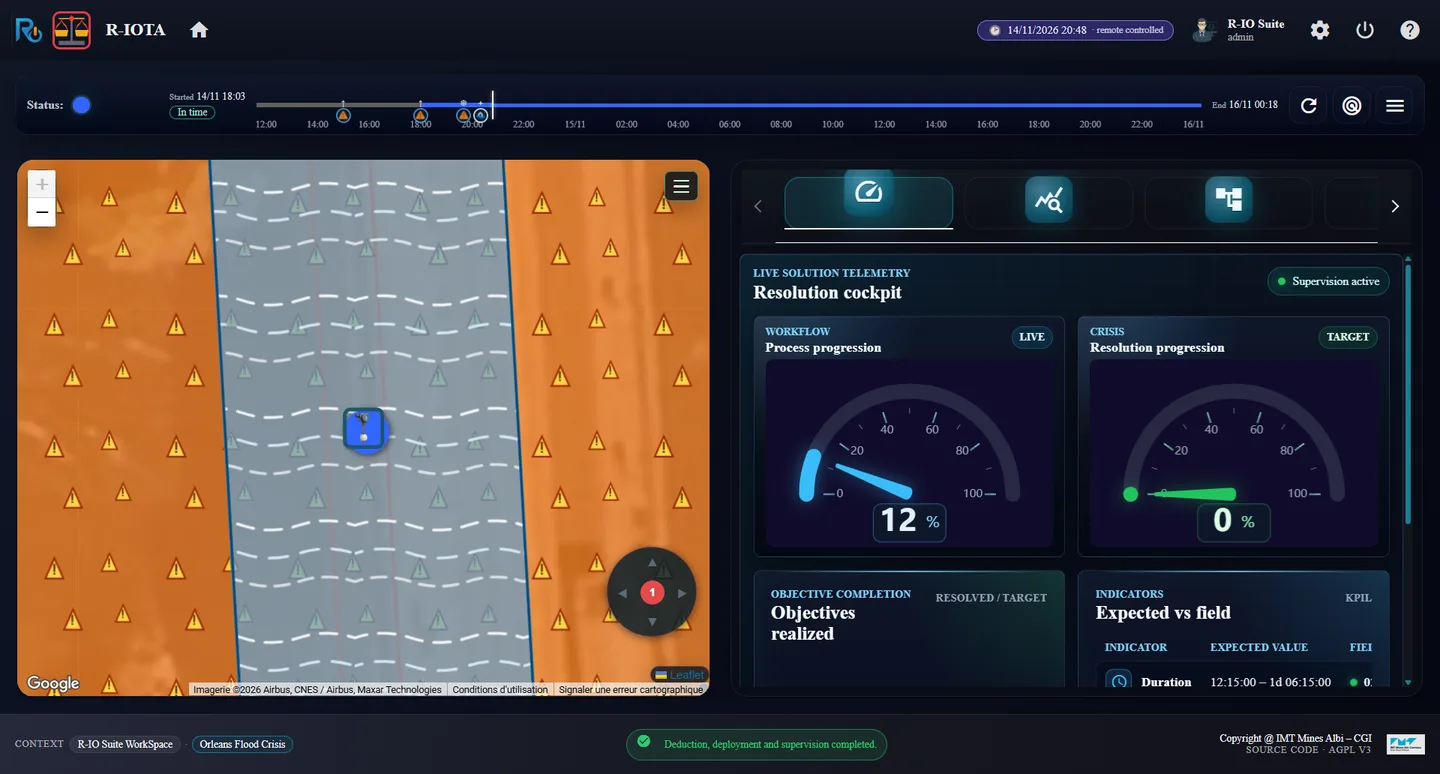
At 20:00 the level reaches 4.6 m: the risk becomes the actuality Loire flood at George-V bridge. The bridge closure, started at 18:18, ends only at 20:48: the preventive procedure cannot be completed before the flood. Its Event_Flow fires and the corrective procedure starts.
Let the clock run past 20:00 (the end of a task plays the steps of the timeline met on the way).
In r-iota, scroll to Objectives realized; in r-ioga, open the To Do List.
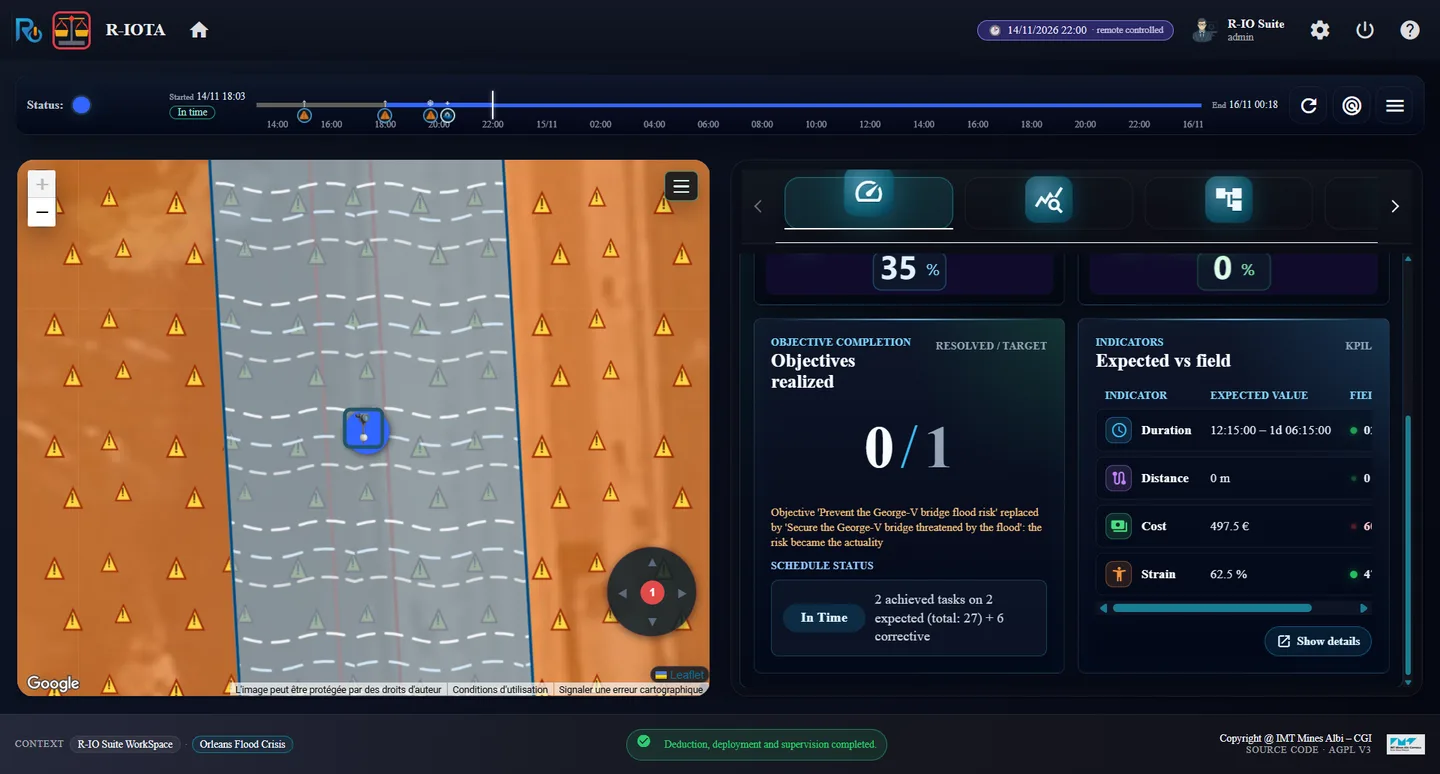
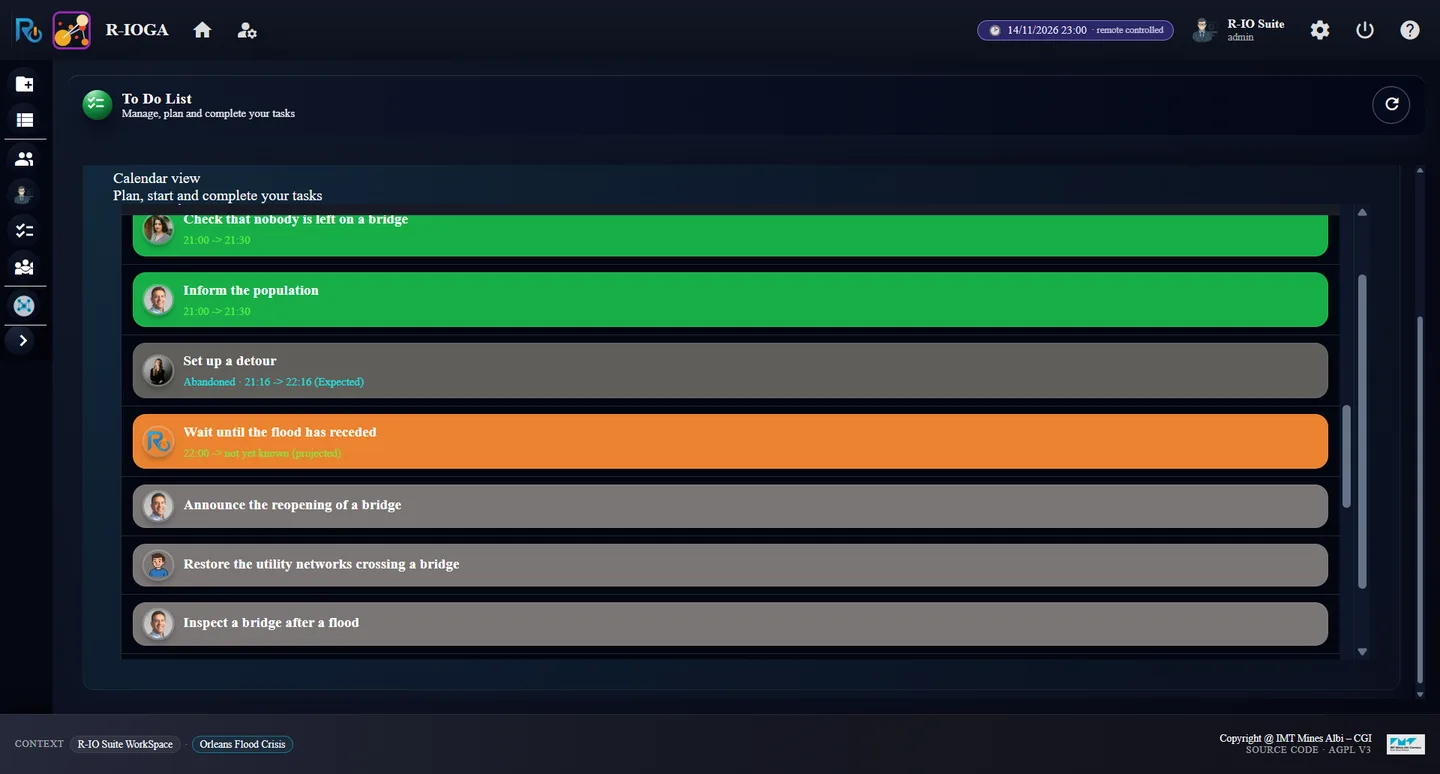
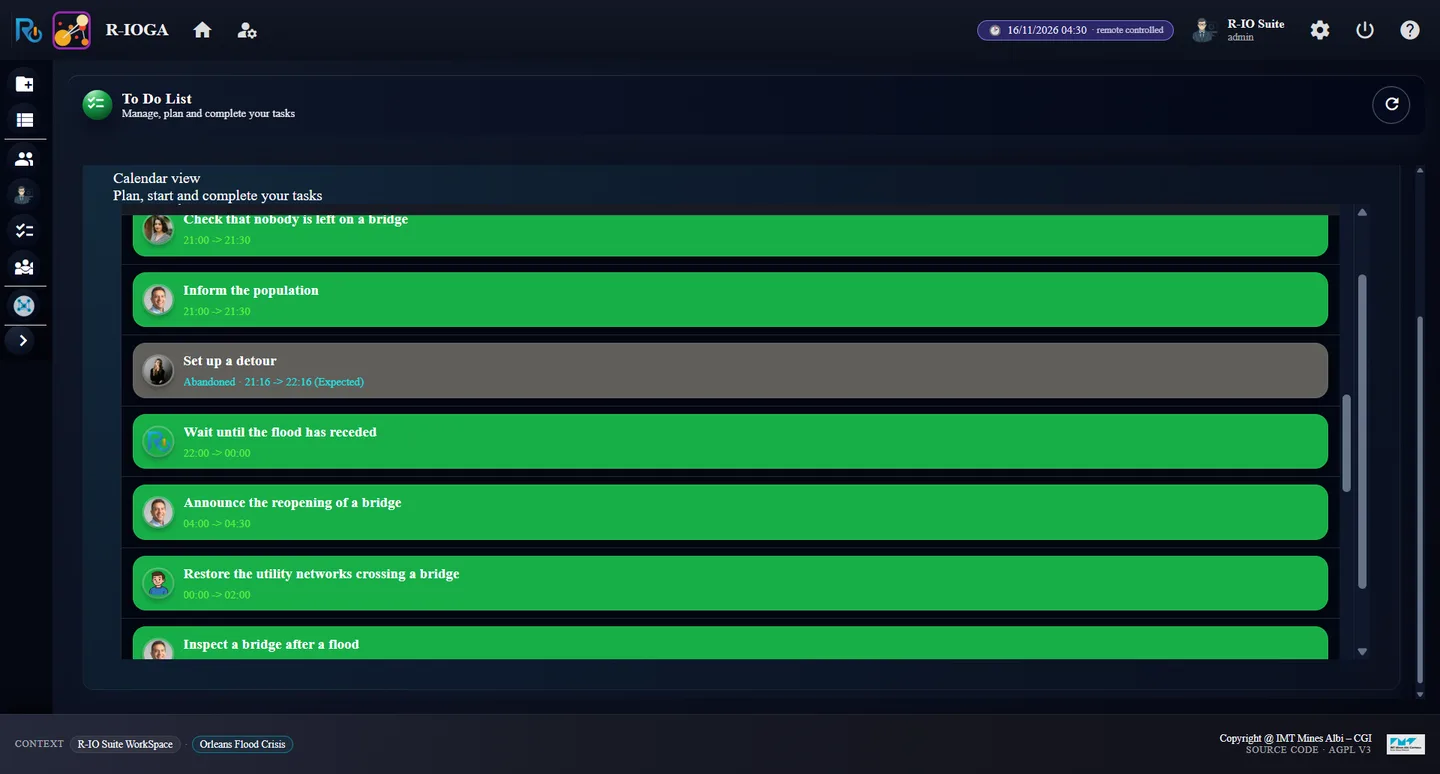
r-iota at 20:48: the flood is on the bridge (hatched water)“Objective ‘Prevent …’ replaced by ‘Secure …’: the risk became the actuality”To Do List: “Set up a detour” abandoned, the corrective wait “not yet known (projected)”
Resultr-iota: the objective counter goes to 0 / 1, with Objective ‘Prevent the George-V bridge flood risk’ replaced by ‘Secure the George-V bridge threatened by the flood’: the risk became the actuality. To Do List: the preventive tasks not started (Set up a detour, Run replacement buses, Inform the population, the preventive inspection and reopening) are Abandoned; Stop a tram line, already done by the preventive, is marked done in the corrective; the corrective tasks start at 21:00.
07 · Step
The waits: an interval of 6 to 24 hours
The corrective holds two Wait Until tasks run by the process engine: Wait until the flood has receded and Wait until a bridge can be inspected. They read their condition again and again; the model only says how long they usually last.
In the To Do List, click Wait until the flood has receded (orange).
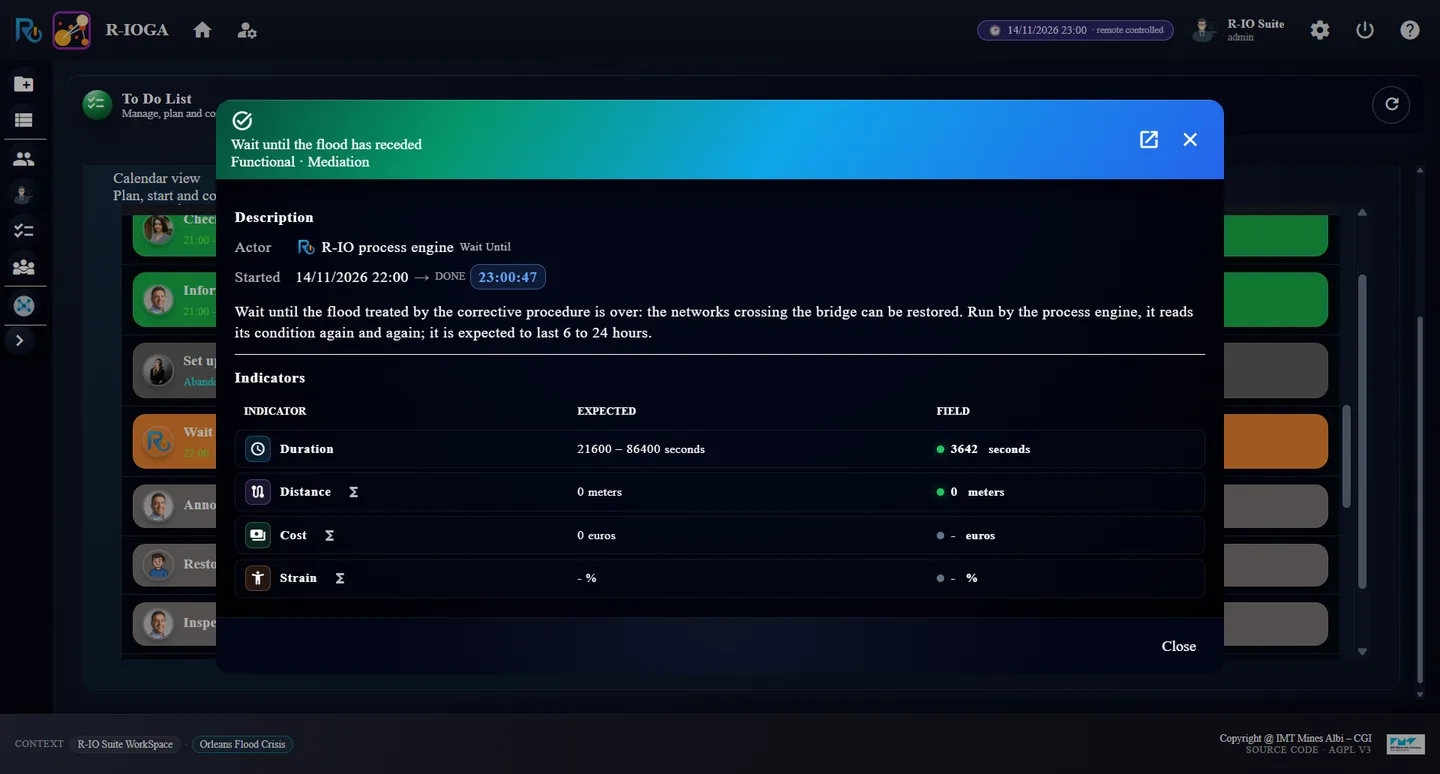
Wait until the flood has receded: expected 21600 – 86400 seconds (6 to 24 h)
ResultThe task started at 22:00. Its expected duration is the modelled interval, 21600 – 86400 seconds (6 to 24 hours): without forecast nothing narrows it, and the To Do List shows its end as not yet known (projected).
08 · Step
Play until the flood recedes
The flood is released when the level stays under 4.0 m for 6 hours: on 16/11 at 00:00 in this timeline.
In r-iosemit, tab TIMELINE, click Next step until 16/11/2026 00:00 (step 18 / 20).
Let the last tasks run, then read r-iota and the To Do List.
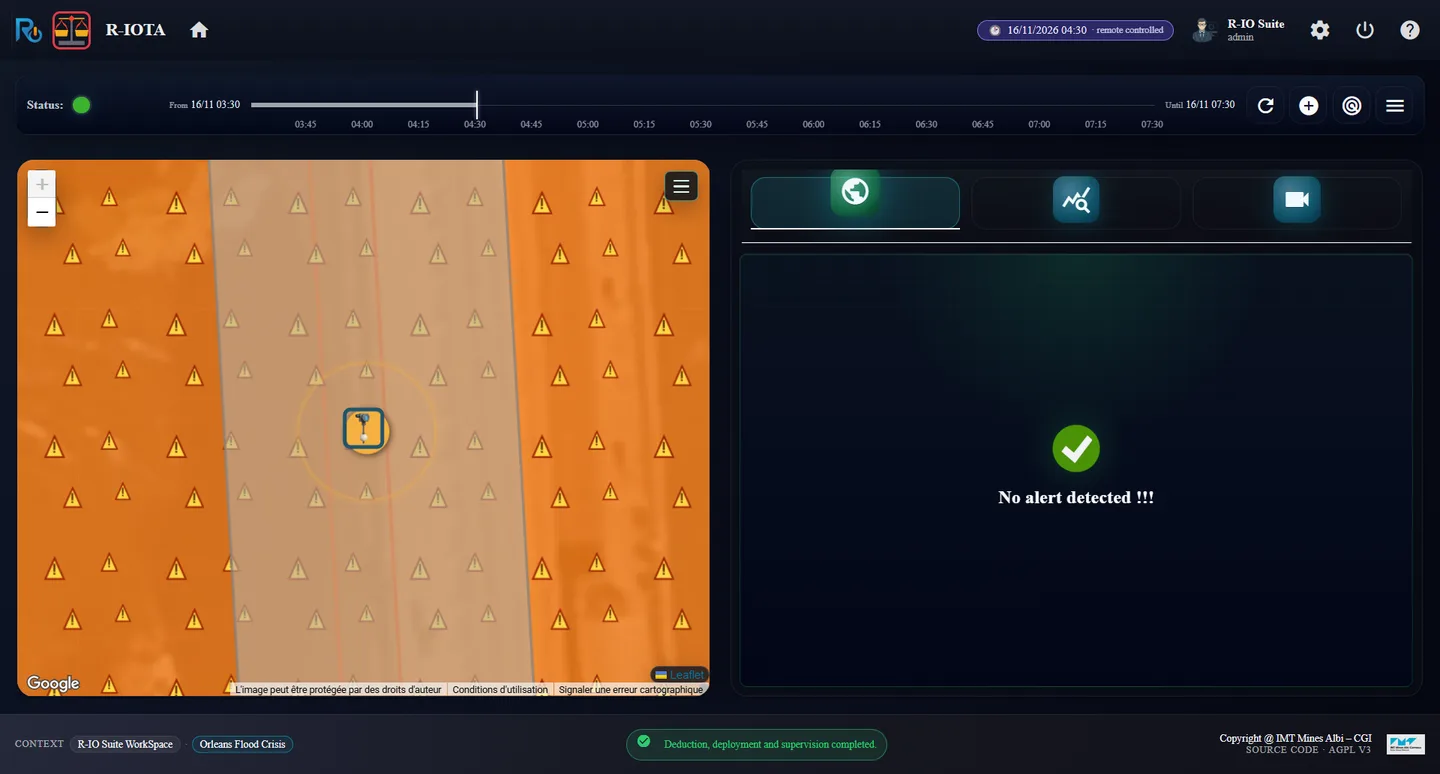
r-iota at the end: no alert, green statusTo Do List: the waits ended at 00:00, inspection, restoration, reopening
ResultBoth waits end at 00:00; Inspect a bridge after a flood and Restore the utility networks run 00:00 → 02:00, Reopen a bridge to traffic 03:00 → 04:00, Announce the reopening 04:00 → 04:30. r-iota shows 1 / 1, 2 achieved tasks on 2 expected (total: 27) + 17 corrective, No alert detected !!! and a green status.
Les prévisions Vigicrues sont coupées : r-io ne connaît que les mesures de la Loire. À 18:00, le niveau (4,1 m) porte le risque de crue du pont George-V à 80 % et r-iota lève une alerte. La déduction planifie la fermeture préventive du pont, avec la procédure corrective en recouvrement. La crue arrive à 20:00, pendant la fermeture : le préventif ne peut pas aller au bout, le correctif prend le relais, et ses attentes durent de 6 à 24 heures, car rien ne dit à r-io quand la crue se retirera.
Ce que montre cet acte
Sans prévision, r-io ne réagit qu’aux mesures. La procédure préventive (fermer le pont avant la crue) et la corrective (sécuriser, attendre, inspecter, rouvrir) sont déduites ensemble ; le correctif est un recouvrement qui ne démarre que si la crue arrive. Ici elle arrive trop tôt : le correctif reprend l’objectif préventif, les tâches préventives non commencées sont abandonnées, celles déjà faites sont marquées faites. Les attentes gardent leur intervalle modélisé de 6 à 24 heures : leur fin est « not yet known ».
01 · Étape
Charger le cas d’usage et ouvrir les applications
Orleans Flood Crisis modélise le pont George-V, sa ligne de tram, son quai, les personnes qui le ferment et l’inspectent, et un capteur de niveau de la Loire dont les règles CEP pilotent le risque et la crue. Chaque acte part d’un r-io neuf : redémarrer la distribution et recharger le cas d’usage. Sinon, les acteurs réservés par l’acte précédent le restent sur les mêmes dates.
Dans r-ioga, Projects workspace, cliquer la carte Orleans Flood Crisis, puis Load.
Fermer Use-case successfully loaded !!! par OK : r-ioga ouvre Project List.
Depuis la colonne APPLICATIONS, ouvrir R-IOSEMIT et R-IOTA, chacun dans son onglet.
r-ioga : les options de chargement d’Orleans Flood CrisisProject List : les lanceurs des applications
Résultatr-iosemit affiche le scénario Loire Flood At Orleans : 20 dates · 40 DATA steps, Forecasts on · 4 ; r-iota affiche No alert detected !!!.
02 · Étape
Couper les prévisions
La frise porte deux pistes : les mesures du capteur (toutes les 3 h) et quatre prévisions Vigicrues (06:00, 12:00, 18:00 et 00:00, chacune sur 24 h). Dans cet acte, r-io ne doit recevoir aucune prévision.
Dans r-iosemit, TIMELINE, cliquer le bouton violet 📉 Forecasts on · 4.
Avant : les 4 prévisions Vigicrues au-dessus des mesures, « Forecasts on · 4 »Après : « Forecasts off · 4 », prévisions barrées, « 4 muted »
RésultatLe bouton affiche Forecasts off · 4, les quatre cartes de prévision sont grisées et barrées, et le compteur indique 20 dates · 40 DATA steps · 4 muted : elles ne seront pas jouées.
03 · Étape
Jouer les mesures jusqu’à 18:00
Chaque Next step joue une date. Le niveau passe de 2 → 2,3 → 2,7 → 3,1 → 3,6 → 4,1 m ; chaque seuil franchi relève la probabilité du risque (0,2, 0,5, 0,8). À 0,8 le risque devient une alerte.
Cliquer Next step six fois, en attendant chaque fois le compteur, jusqu’à 14/11/2026 18:00 (étape 6 / 20).
Dans r-iota, lire l’alerte, puis ouvrir l’onglet Forecast (deuxième onglet).
r-iosemit à 18:00, étape 6 : le niveau à 4,1 mr-iota : 1 alerte sûre, la zone de danger autour du pontOnglet Forecast : « No forecast published yet »
Résultatr-iota affiche 1 SURE ALERTS et un statut rouge : George-V bridge flood risk at George-V bridge, prévenu par Prevent the George-V bridge flood risk. L’onglet Forecast confirme que les prévisions sont coupées : No forecast published yet: the projection appears as soon as a forecast of a sensor is received. La réglette de supervision s’arrête à maintenant : rien n’est projeté.
04 · Étape
Déduire le préventif et le correctif
Sans prévision, la déduction sait seulement que le risque est à 80 % : elle planifie de le prévenir, et garde la procédure corrective en réserve au cas où la crue arriverait malgré tout.
Cliquer FIND SOLUTION(S) : Include forecast reste à NO (aucune prévision reçue). Mettre Advanced options strategy à YES et cliquer Find.
Dans Drools - Crisis Satisfaction Strategy, le risque a Preventive et Corrective cochés : Close a bridge to traffic le prévient, Secure the surroundings of a threatened bridge traite la crue. Cliquer Deduce.
Lire Solution found, puis cliquer Deploy and supervise.
Find solution(s) : Include forecast NO, Advanced options strategy YESLa stratégie : Preventive et Corrective cochés pour le risqueSolution found : la Nominal SubTask (préventif) et son recouvrement correctif sur un Event_Flow (CE)
Résultat27 task(s) in the process : Start → Nominal SubTask → End, et depuis la Nominal SubTask un Event_Flow (CE) vers Secure the surroundings of a threatened bridge, qui ne démarre que si l’actualité Loire flood at George-V bridge apparaît.
05 · Étape
Déployer et laisser les tâches se dérouler
r-iosemit peut jouer le terrain : en Auto, chaque tâche est acceptée dès que le processus l’atteint et se termine après sa durée, en faisant avancer l’horloge.
Dans r-iosemit, onglet TASKS, cocher AUTO dans l’en-tête de la situation George-V bridge flood risk at George-V bridge.
Suivre l’horloge : Stop a tram line 18:02 → 18:18, puis Close a bridge to traffic à partir de 18:18, pour 2 h 30.
Déployé : le plan tourne, durée attendue 12:15 – 1 j 06:15
Résultatr-iota affiche total: 27, 0 / 2 objectifs et un statut bleu. La durée attendue du plan est un intervalle, 12:15:00 – 1d 06:15:00 : les attentes du correctif durent de 6 à 24 heures.
06 · Étape
La crue arrive à 20:00 : le préventif ne peut pas aller au bout, le correctif prend le relais
À 20:00 le niveau atteint 4,6 m : le risque devient l’actualité Loire flood at George-V bridge. La fermeture du pont, commencée à 18:18, ne finit qu’à 20:48 : la procédure préventive ne peut pas aller au bout avant la crue. Son Event_Flow se déclenche et la procédure corrective démarre.
Laisser l’horloge dépasser 20:00 (la fin d’une tâche joue les étapes de la frise rencontrées en chemin).
Dans r-iota, descendre jusqu’à Objectives realized ; dans r-ioga, ouvrir la To Do List.
r-iota à 20:48 : la crue est sur le pont (eau hachurée)« Objective ‘Prevent …’ replaced by ‘Secure …’: the risk became the actuality »To Do List : « Set up a detour » abandonnée, l’attente corrective « not yet known (projected) »
Résultatr-iota : le compteur d’objectifs passe à 0 / 1, avec Objective ‘Prevent the George-V bridge flood risk’ replaced by ‘Secure the George-V bridge threatened by the flood’: the risk became the actuality. To Do List : les tâches préventives non commencées (Set up a detour, Run replacement buses, Inform the population, l’inspection et la réouverture préventives) sont Abandoned ; Stop a tram line, déjà faite par le préventif, est marquée faite dans le correctif ; les tâches correctives démarrent à 21:00.
07 · Étape
Les attentes : un intervalle de 6 à 24 heures
Le correctif contient deux tâches Wait Until exécutées par le moteur de processus : Wait until the flood has receded et Wait until a bridge can be inspected. Elles relisent leur condition sans cesse ; le modèle dit seulement combien de temps elles durent d’habitude.
Dans la To Do List, cliquer Wait until the flood has receded (orange).
Wait until the flood has receded : attendu 21600 – 86400 secondes (6 à 24 h)
RésultatLa tâche a démarré à 22:00. Sa durée attendue est l’intervalle modélisé, 21600 – 86400 secondes (6 à 24 heures) : sans prévision rien ne le resserre, et la To Do List affiche sa fin comme not yet known (projected).
08 · Étape
Jouer jusqu’à la décrue
La crue est levée quand le niveau reste sous 4,0 m pendant 6 heures : le 16/11 à 00:00 dans cette frise.
Dans r-iosemit, onglet TIMELINE, cliquer Next step jusqu’à 16/11/2026 00:00 (étape 18 / 20).
Laisser se dérouler les dernières tâches, puis lire r-iota et la To Do List.
r-iota à la fin : aucune alerte, statut vertTo Do List : les attentes finies à 00:00, inspection, rétablissement, réouverture
RésultatLes deux attentes finissent à 00:00 ; Inspect a bridge after a flood et Restore the utility networks se déroulent de 00:00 à 02:00, Reopen a bridge to traffic de 03:00 à 04:00, Announce the reopening de 04:00 à 04:30. r-iota affiche 1 / 1, 2 achieved tasks on 2 expected (total: 27) + 17 corrective, No alert detected !!! et un statut vert.